In this article
An alert is only a prompt to check again. Micro Center warns that stock can sell out quickly, and the text does not reserve an item.
Key facts
| Question | Answer | Important caveat |
|---|---|---|
| Does Micro Center have a stock alert? | Yes, some sold-out product pages offer a store-specific back-in-stock text. | The control is item-, store-, account-, and page-state dependent; do not assume every listing has it. |
| What wording identifies the restock alert? | Look for Text me when this is back in stock at [store]. | A generic Text To Me action can instead send the current product to your phone for easier in-store access. Read the explanatory text. |
| What are Micro Center Insider texts? | A separate SMS program for offers, coupons, product launches, and informational alerts. | The Insider Text Messaging terms do not promise a per-SKU restock subscription; use the exact product-page wording. |
| How current is the stock display? | Micro Center's current stock guide says availability is refreshed every 15 minutes. | A unit held by another shopper may still affect what is actually available. |
| Does an alert reserve the item? | No. Reopen the exact page and reserve eligible inventory for pickup. | A cart or List alone is not a reservation; wait for the pickup confirmation. |
How to turn on a Micro Center stock alert
- Set Your Store to the location where you could actually pick up the item. Micro Center's stock and availability guide says search results and product pages reflect the selected store.
- Open the exact product page. Confirm the model, six-digit SKU when available, store name, and stock state together.
- If the item is sold out, look for the full phrase Text me when this is back in stock at [store]. Current product-page copy says these alerts use the mobile number saved to your account, so add or confirm that number in Account Settings.
- Do not treat every Text To Me link or general Micro Center Insider message as a restock subscription. On a current Vertical Wireless Mouse product page, the same page can expose both a generic send-this-product-to-your-phone action and the fuller store-specific back-in-stock wording. The sentence beside or inside the control tells you which action it performs.
- When a back-in-stock text arrives, reopen the product page, verify the same store, and reserve the item if pickup is offered. Wait for the reservation-ready email before making a special trip.
On August 10, 2026, an indexed Vertical Wireless Mouse product page showed 0 NEW IN STOCK at Charlotte Store, the store-specific back-in-stock wording, an Account Settings step for the mobile number, and the warning that alerts do not reserve inventory. That is a current item-and-store example, not a promise that the same control appears on every product.
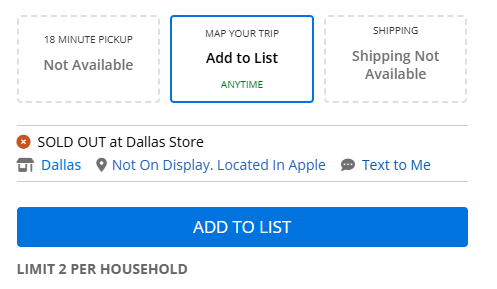
Screenshot: Micro Center's stock guide shows a store-specific SOLD OUT state beside Text to Me and Add to List. Captured 2026-08-10 from the official 497 px source.
Why do older Micro Center answers say there are no stock alerts?
An official Micro Center Community reply from November 2020 said the retailer had no notification system for an item returning to stock. That historical answer still appears in search, but it does not describe every current product page.
On August 10, 2026, the indexed Vertical Wireless Mouse page showed Text me when this is back in stock at Charlotte and warned that the alert did not reserve inventory. The two official pages describe different product-page behavior at different times. The current evidence supports a narrow answer: Micro Center now offers item-specific texts on some sold-out pages, not a universal alert for every listing.
How often does Micro Center update stock—and how accurate is it?
Micro Center says product availability is updated every 15 minutes. Its current Is an item in stock? guide also says a completed purchase updates inventory in real time, but the displayed count may not reflect an item already in another shopper's possession inside the store.
The same guide explains the quantity labels: 25+ IN STOCK is the high-stock state, while counts below 25 show an exact reported number. When the count is low or the drive is long, Micro Center recommends adding the item to the cart and reserving it rather than relying on the label alone.
A reservation can still depend on the product. Micro Center's online reservation instructions say some in-store-only products show Locate instead of Add to Cart, and an item can be listed in stock without being eligible for online pickup. Its restock inquiry guidance also says exact shipment dates are not always known.
What to use when the native text is missing
Start with the retailer's own page and alert. Add another tool only for a condition the native flow does not cover.
| Option | Best for | Limitation to check |
|---|---|---|
| Micro Center product page and native text | Store-specific inventory and an item-specific text when offered | Availability can change before you act; not every page exposes the alert |
| Manual bookmark | A low-urgency item you can check occasionally | Repeated checking is easy to forget and gives no notification |
| ShelfRadar | A mobile, cross-retailer tracker | The vendor lists Micro Center among supported sources, but product, store, and in-store coverage still need verification for your item |
| OpenBoxTracker | Micro Center open-box inventory for a specific SKU | It is an open-box tracker, not a general new-inventory replacement for Micro Center's page |
| Visualping | A cloud-based visual page monitor | Vendor pricing, privacy, check frequency, and compatibility require a separate review |
These services are alternatives to evaluate, not confirmations of physical shelf stock. A third-party alert should always send you back to the exact Micro Center product page and selected store.
Monitor one store-specific stock block with PageDog
Use Micro Center's native back-in-stock text first. If the exact alert wording is absent, select the smallest complete region containing the product identity, selected store, availability, and pickup state. A precise goal could be: “Alert me when AI Learning Robot is in stock at Columbus and pickup can be reserved.”
PageDog monitors one visible part of a website on your Mac while the app is open and the Mac is awake and online. It does not access Micro Center's inventory database, predict a shipment, reserve or buy the item, or bypass login, CAPTCHA, rate limits, or retailer controls. If the page requests attention, handle it manually; the signed-in page guide explains the recovery boundary.
The retailer-product-location discipline is the same one used when checking Walmart NeeDoh stock near you: a shipped offer, another store, or a nearby variant does not prove that the exact item is ready where you intend to collect it.
A practical decision rule
- Use the native text when the page explicitly says it will notify you when that item is back in stock at the selected store.
- Reserve immediately when the exact item is in stock and eligible for pickup; wait for confirmation before traveling.
- Read the label carefully when you only see Text To Me. Confirm whether it describes a restock subscription or merely sends the product to your phone.
- Use a page monitor only for the remaining visible gap when the native restock wording is absent or the condition is more specific.
- Treat low stock as uncertain when the trip is long. A positive count is a signal; a confirmed pickup is stronger evidence.
Research sources
Official and primary
- Micro Center: How can I check the Stock or Availability of an item? — selected-store inventory, product-page stock states, quantity limits, and reservation caveats; updated February 13, 2026 and checked August 10, 2026.
- Micro Center: Is an item in stock? — current 15-minute refresh statement, quantity display, in-store shopper caveat, and pickup recommendation; checked August 10, 2026.
- Micro Center: How to Reserve an Item Online — pickup confirmation and products that cannot be reserved online; checked August 10, 2026.
- Micro Center: Restock Inquiry — shipment-date uncertainty and store-specific website checks; updated June 13, 2025 and checked August 10, 2026.
- Micro Center: Insider Text Messaging — separate marketing and informational SMS terms; checked August 10, 2026.
- Micro Center Community: Out of Stock Item — historical November 2020 reply saying an item-level notification system was not available at that time; checked August 10, 2026 and used only to explain the outdated search result.
- Micro Center: Vertical Wireless Mouse — current product-page example of the generic Text To Me flow and the fuller store-specific back-in-stock copy; search-index verified August 10, 2026. Direct automated browsing met Micro Center's security verification, so recheck the live state before relying on this example.
Other tools evaluated, not endorsed
- ShelfRadar — vendor claims for Micro Center support, per-SKU alerts, and store-aware coverage; checked August 10, 2026.
- OpenBoxTracker — Micro Center open-box SKU tracking and alerts; checked August 10, 2026.
- Visualping in-stock alerts — generic cloud visual-monitoring workflow; checked August 10, 2026.