
In this article
Treat every stock label as a current signal, not a promise that the toy will still be on the shelf when you arrive. A confirmed pickup order is stronger evidence than an “In stock” search result.
Key facts
| Question | Answer and caveat |
|---|---|
| When does Walmart restock NeeDohs? | Walmart publishes no universal weekday or hour. Assortment and replenishment differ by store and item. |
| How do I check stock near me? | Set a ZIP code and preferred store, then use In-store or Check stores nearby. Shipping and Marketplace offers do not prove local shelf stock. |
| Does Walmart offer an alert? | The tested item showed Notify me when it is back in stock. Walmart may use different alert wording, and the option is not shown for every item or fulfillment state. |
| Does Walmart save the selected store? | In an August 4, 2026 test, Sacramento Gerber Rd Supercenter remained after a reload and appeared on the item page. Verify the store name each time. |
How to check Walmart NeeDoh stock near you
- Open Walmart's NeeDoh search and set the ZIP code and preferred store in the location control at the top of the page.
- Turn on In-store. This removes many shipping-only and Marketplace results that do not describe the selected store's shelf inventory.
- Open the exact NeeDoh you want. Match the product name, shape, size, color or assortment, and pack count; a different variant can have a different status.
- Read the selected store, fulfillment method, stock label, and seller together. Use Check stores nearby if the chosen store is out of stock.
- If the item page shows Notify me or Get in-stock alert, enable Walmart's native alert before adding another monitoring tool. If it does not, save the item to a list so it is easy to revisit.
- Before making a special trip, place a pickup order when pickup is offered and wait for Walmart's confirmation. If pickup is unavailable, call the store rather than treating an online label as a reservation.
Walmart's own NeeDoh shopping page gives the same basic workflow: set a ZIP and preferred store, check the item page, use pickup or delivery filters, and look for Get in-stock alert when available. It also says availability can change during the day as stores receive stock and orders are filled.
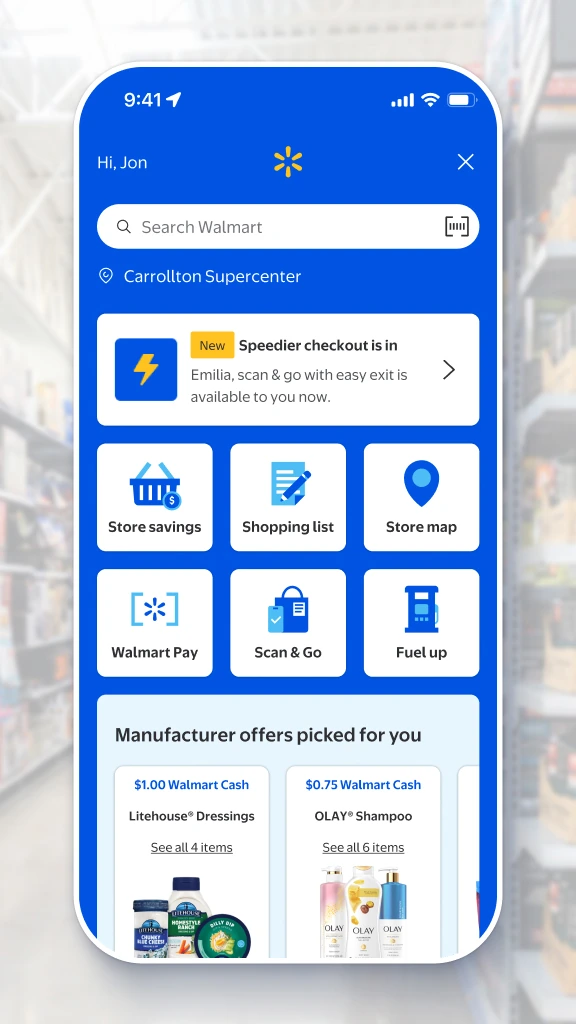
Official walkthrough image: Walmart Store Mode shows a selected Carrollton Supercenter above the native store search and map tools. Downloaded from Walmart's live guide on 2026-08-04 and rendered from the original 576 px source at 288 px for true 2× density.
Does Walmart keep your selected store?
It did in the live browser test for this guide. After selecting Sacramento Gerber Rd Supercenter, reloading the NeeDoh search kept the same store. The Super Ripples page then showed that store, Out of stock, Aisle I7, Check stores nearby, and Walmart's native Notify me option together.
That observation explains why the preferred-store step matters: local status is tied to browsing state. It does not prove that Walmart will preserve the store forever or across every private window, cleared cookie, signed-out session, device, or app update. Before interpreting a status, read the store name shown on that page.
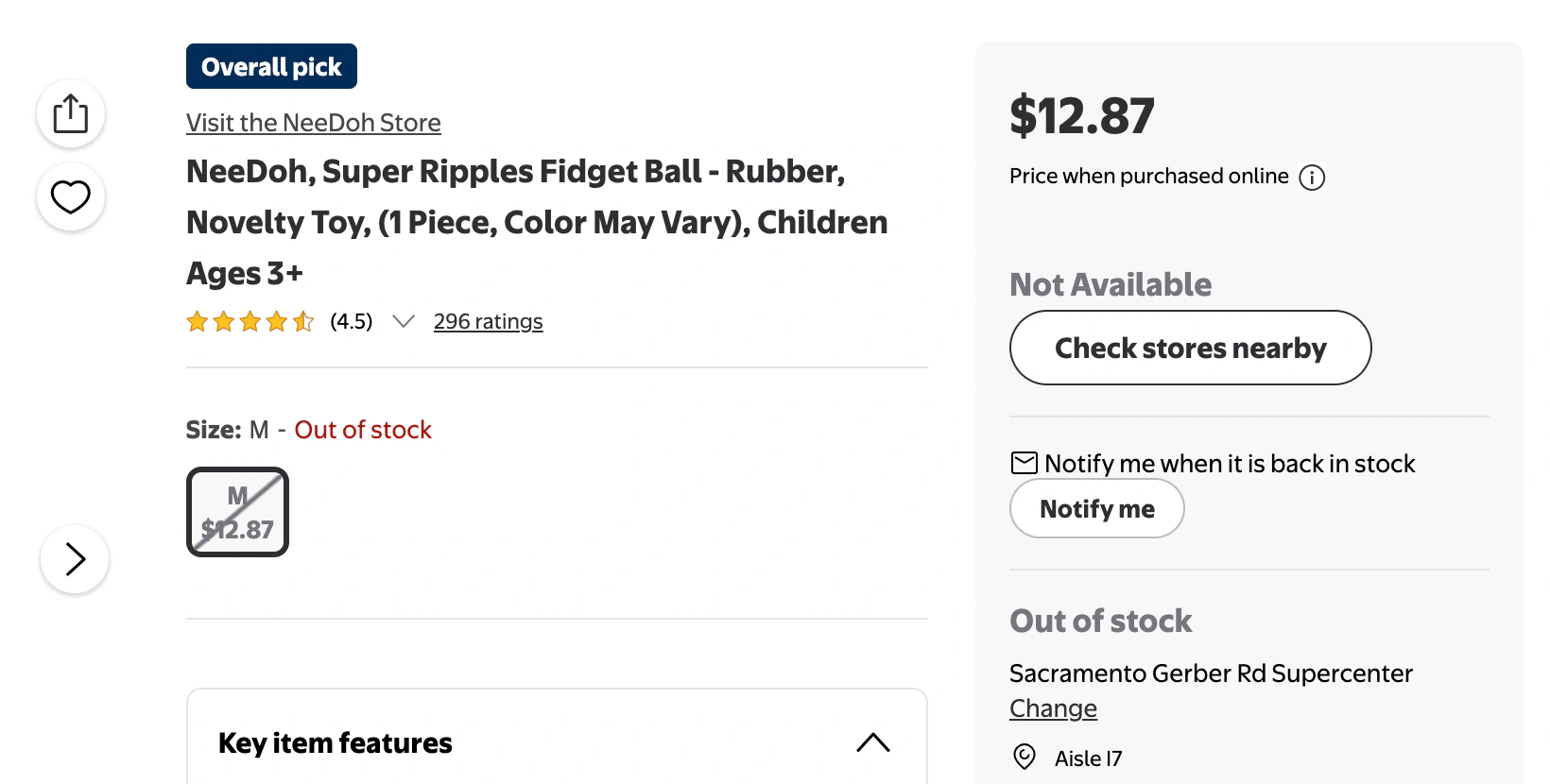
Live screenshot: Walmart's NeeDoh Super Ripples page shows the exact item, native alert, selected Sacramento store, local status, nearby-store control, and aisle. Captured 2026-08-04 at native 2× density; cropped and WebP-encoded without resizing, sharpening, or UI alteration.
The same test also exposed a common trap. The unfiltered search showed many shipped items from online sellers, while the In-store view for the selected store returned only two NeeDoh products, both out of stock. A shipped offer at a higher Marketplace price is not a local restock.
When should you check again?
There is no evidence-backed “best Walmart NeeDoh restock day” that applies nationwide. Walmart's current guidance says assortments vary by location and season, inventory can change throughout the day, and restocks arrive on different schedules. A report that one store stocked toys on Wednesday morning describes that store and that week—not a Walmart rule.
Use events on the exact page instead of a rumored clock:
- a native in-stock alert arrives;
- the selected store changes from Out of stock to In stock or Pickup available;
- Check stores nearby finds a location where pickup can be ordered;
- Walmart adds a new listing or variant for the NeeDoh you want.
If the item is time-sensitive, checking nearby stores once is more useful than repeatedly refreshing one store. If it is not urgent, let Walmart's alert do the first work and avoid aggressive polling.
What third-party NeeDoh trackers can confirm
Neither tool can confirm Walmart shelf stock for this guide:
- BotBro's Walmart page markets scheduled checks, SMS alerts, add-to-cart, auto-checkout, and anti-detection. Its demonstration is still “coming soon,” and no independent Walmart NeeDoh test was available, so those remain vendor claims rather than a recommendation.
- NeeDohTracker says its ZIP inventory check uses Target signals. Its restock feed mirrors unverified community posts and may contain affiliate links. It can surface a lead, but not verified Walmart near-store inventory.
Confirm every lead on Walmart. For product authenticity rather than stock, Schylling's official NeeDoh site and authorized-dealer directory identifies Walmart as an authorized retailer.
Monitor one visible Walmart status with PageDog
Use Walmart's own alert first. PageDog is an optional second layer when the native page does not offer an alert or when the condition is more specific—for example, “Super Ripples shows Pickup available at Sacramento Gerber Rd Supercenter.”
Select the smallest complete visible area that contains the exact item, selected store, fulfillment method, seller, and stock label. PageDog monitors that visible state; it does not access Walmart's inventory database, confirm the physical shelf, reserve or buy the toy, or bypass login, CAPTCHA, rate limits, or retailer controls.
Before relying on a watch, confirm the intended store still appears in PageDog's saved page session. Checks run locally while PageDog is open and the Mac is awake and online. The PageDog documentation explains those limits, and the guide to monitoring a signed-in page respectfully covers session recovery.
A practical decision rule
- Use Walmart's alert when Notify me or Get in-stock alert is visible for the exact item.
- Order pickup when the correct item and store can be reserved; wait for confirmation before traveling.
- Check nearby stores when your preferred store is out of stock and the trip is reasonable.
- Use PageDog only for a remaining visible condition that Walmart's native alert does not express.
- Wait rather than guess when every signal is unconfirmed; no weekday or time guarantees the next NeeDoh delivery.
Research sources
Official and primary
- Walmart NeeDoh search — live selected-store and In-store availability test; checked 2026-08-04.
- Walmart: NeeDoh stores and local availability — preferred-store, nearby-store, fulfillment, and optional in-stock-alert guidance; checked 2026-08-04.
- Walmart: NeeDoh Super Ripples product page — observed selected-store persistence, native Notify me option, out-of-stock status, aisle, and Check stores nearby control; checked 2026-08-04.
- Official NeeDoh by Schylling — brand authenticity and authorized-retailer directory; checked 2026-08-04.
Competitors evaluated, not endorsed
- BotBro Walmart automation — vendor feature claims and missing live demonstration; checked 2026-08-04.
- NeeDohTracker and its restock-feed disclaimer — Target-based ZIP signals and unverified affiliate/community posts; checked 2026-08-04.