In this article
Start with Sephora’s own stock notification
Sephora’s US Finding Products guide says replenishment varies by item and brand. It also says some product pages offer an “email me” option when an item is unavailable. Select the version you actually want before requesting that notification.
If the page offers a text alert instead, read the terms shown with that control. Sephora’s US SMS terms describe a back-in-stock alert program, including messages when an item is or will be restocked. That does not establish that every item has a text option or that an alert reserves one for you.
These are US-site instructions checked on September 27, 2026. Other Sephora storefronts can use different controls and inventory. Keep the country, shade and size together in your notes; a matching product name alone is not enough.
| What you see | What to do next |
|---|---|
| Your shade is unavailable, but another shade is orderable | Keep the desired shade selected; check its notification option. |
| Shipping is unavailable | Check pickup at a store you can actually reach. |
| A nearby store has no stock | Check a different store separately, without assuming online stock is identical. |
| “Coming soon” appears | Look for a dated release announcement; do not infer a weekly restock. |
| A stock alert arrives | Reopen the listing and verify the current purchase option. |
A shipment day is not a promise about your item
The official guidance does not give one nationwide Tuesday, Thursday or overnight release time for all products. An employee’s account of a particular store can be useful local context, but it cannot establish when your shade will become available online.
There are several questions hiding inside “when does Sephora restock?” You might mean an existing shade returning, a new collection launching, a store receiving a shipment or a reward becoming redeemable. Identify which one you are waiting for before following a calendar tip.
For example, suppose you want a full-size foundation in one shade. A travel size returning, a neighboring shade becoming available or a promotional banner changing does not solve that problem. Write down the full product name, shade and size. That short checklist makes both native alerts and any additional page watch easier to interpret.
If you need the item for a fixed occasion, choose your own cutoff date. After that date, check another authorized retailer or an acceptable substitute instead of assuming a restock will happen before your event. No public weekly cadence can make that personal deadline safe.
Check pickup before waiting for online stock
Sephora’s pickup guide shows the native sequence: choose the product and store, place the order, then wait for the ready notification. A nearby store is a separate fulfillment choice worth checking before starting a longer wait.
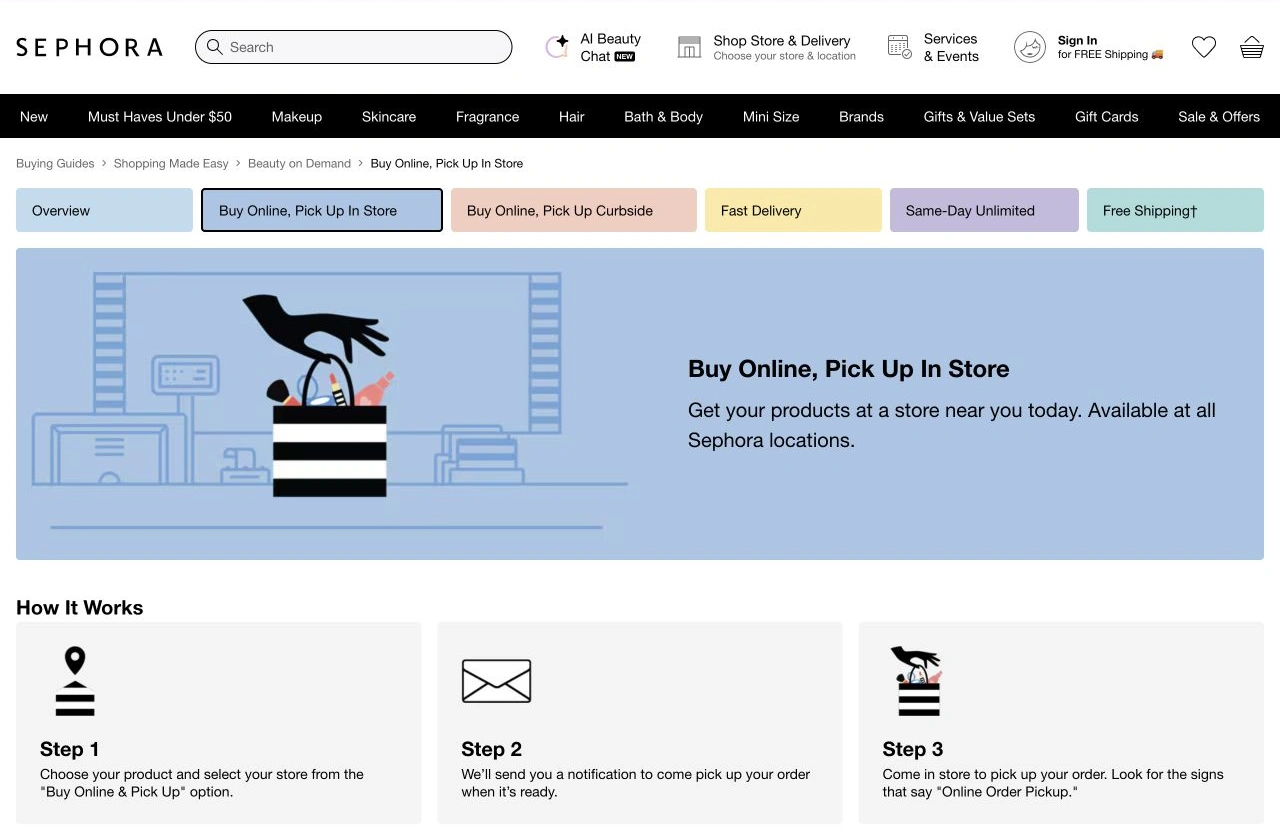
Source: Sephora, captured September 27, 2026. The steps distinguish choosing store pickup from receiving confirmation that the order is ready. Open the full-size image.
The pickup FAQ says the ready notification typically arrives within four hours; an order close to closing time may be ready the next morning. It also warns that an item can turn out to be unavailable while the order is processed. Check which items the ready email actually confirms before traveling.
A back-in-stock alert and an order-ready message serve different purposes. The first invites you to check availability. The second concerns an order you have already placed. Neither a search-result snippet nor an old screenshot replaces the current order status.
Kristi Allure’s April 3, 2024 walkthrough demonstrates the shipping, delivery and pickup choices, with the Sephora section beginning around 0:44. It is an independent creator tutorial with affiliate links, not an official stock announcement. Use the current Sephora page for today’s buttons and availability; the older sale offers in the video are historical.
Watch one visible availability condition on your Mac
When a native alert covers your exact item, start there. An additional PageDog watch is useful when you want to check a particular visible result yourself—for example, whether a selected shade is orderable for shipping, rather than whether anything on the product page changed.
PageDog’s availability monitoring workflow checks a selected visible area locally on your Mac against a condition you describe. A practical setup is:
- Open the US product page in PageDog and select the intended shade, size and fulfillment option yourself.
- Select the visible area containing those identifiers and the availability control. Keep unrelated recommendations outside it.
- Describe the exact result: “Notify me when this selected shade and size are available to order for shipping.”
- Run a check and inspect the captured evidence. Confirm the page still shows your intended selection after it reloads.
- When notified, open Sephora and check the live listing before ordering yourself.
Do not assume a store choice or shade selection survives every reload. If the page resets to a default variant, a watch can answer the wrong question even though the screenshot looks plausible. Recheck the selection or use a stable product URL that visibly restores it. Our guide to monitoring a website for changes explains how a narrow target reduces irrelevant updates.
PageDog needs an awake, connected Mac for local checks. Hosted AI evaluates selected evidence; “local” does not mean every part of analysis is offline. A login prompt, CAPTCHA or blocked region may need your attention. PageDog cannot predict deliveries, reserve stock, bypass a challenge or buy the item. This article verifies public instructions, not a future Sephora restock or notification-delivery speed.
Choose the next action from the exact listing
Use the native alert when it is offered for the right variant. Check a reachable store if pickup would solve your problem sooner. Add a narrow page watch only when the visible state matters beyond the native notification, and inspect its first evidence before relying on it.
The same regional-stock distinction appears in our Jellycat restock guide, but its notification instructions are separate. Each retailer’s current product page remains the authority for what you can order.
Sources
- Product guidance: Sephora Finding Products and SMS terms.
- Fulfillment: Official pickup steps and pickup FAQ.