
In this article
Try the product’s own stock email first
The official US restock help article, updated June 23, 2026, directs shoppers to the notification option on an unavailable product’s page. Enter your email there to request a message when it returns.
This is the simplest route when the option is available for the item you want. Jellycat’s website guide also includes an official video demonstration under “Notify me when back in stock.” Use that guide if you are unsure which control to look for.
Keep a note of the toy’s full name, size and storefront. A notification is a reason to open the listing and check the current offer; it is not a reservation or a promise that stock will remain available until you arrive. We checked the public instructions, not email-delivery speed.
| Your question | Most useful first check |
|---|---|
| Is this exact toy available now? | Its product page and selected size |
| What has returned recently? | The regional Back In Stock collection |
| Will I hear when my item returns? | Its native stock email, when offered |
| Can I find it in a physical shop? | Jellycat’s stockist locator, then the shop itself |
| Is there a fixed weekly restock time? | A current official announcement for that specific release |
What the current US catalog actually shows
The US Back In Stock collection displayed 40 items in our September 21, 2026 check. Its first row included Amuseables Toffee Apple, Ooky Jack O Lantern, Broox Bat and Amuseables Peanut ‘Cat’.
The visible badges were mixed: Toffee Apple showed “Back in Stock,” while the other three showed “New In.” That makes the collection useful for browsing, but its total is not a count of units or a precise log of every item’s restock time.
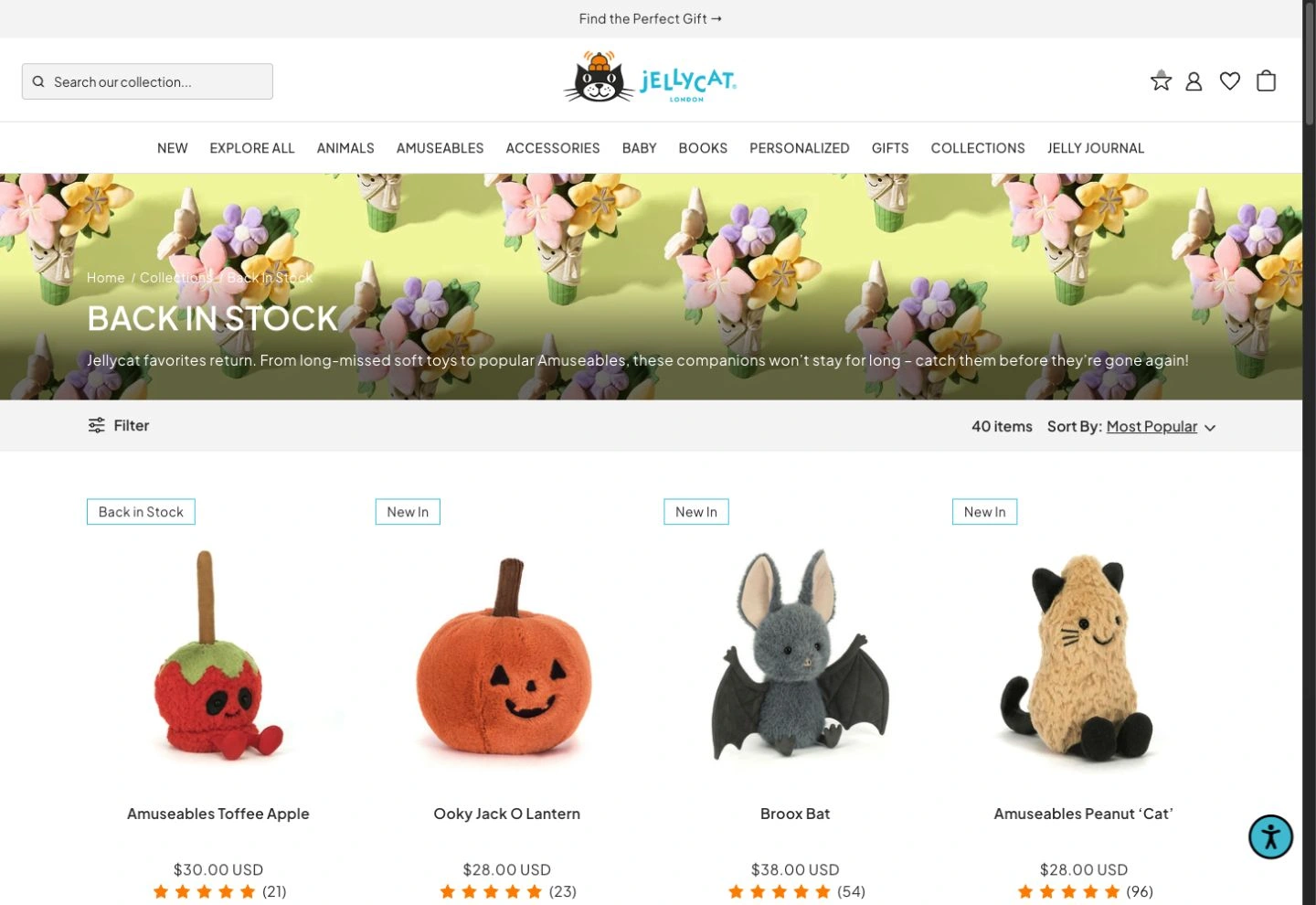
Source: Jellycat US Back In Stock, captured September 21, 2026. Catalog membership and badges do not establish availability for every size. Open the full-size image to inspect the labels.
Open the individual product after finding it in the collection. A familiar name or photo is not enough when the product has several sizes. Check the selected option and its ordering control rather than relying on a category card’s starting price.
Keep the regional store and size together
Jellycat’s site footer links separate UK, US, European and other regional stores. The US product pages we checked identify delivery from that storefront to the United States, Canada and Mexico. A link shared by a UK collector may therefore lead you to a different catalog and purchasing route.
Use a short record such as “US storefront / Blossom Cream Bunny ‘Berry’ / Medium”. That example names a specific page and size; it does not claim the toy is unavailable or predict its next delivery. The product page is where to verify the current selection.
Before interpreting a “restocked” message, ask:
- Does the link open the storefront that serves my destination?
- Is it the same character, color and size?
- Does the live product page actually allow that option to be ordered?
- Is the announcement from Jellycat itself or a separate retailer?
The same discipline matters for other collectible stores. Our Pokémon Center restock guide explains its different native update and access rules; those rules should not be imported into Jellycat shopping.
Treat Tuesday or Friday claims as observations
Two commercial monitoring pages illustrate why a fixed-day answer needs scrutiny. TYPA’s Jellycat tracker describes Tuesday restocks, while Visualping’s guide points to Fridays and mid-afternoon UK time. Both promote their own monitoring services; neither claim becomes an official timetable simply by appearing in search.
The official US help page checked for this article supplies a product notification route, without a universal weekday or hour. Use an explicit, dated announcement when Jellycat names a particular launch. Otherwise, distinguish a tracker’s observed pattern from a commitment covering your toy and region.
Also separate new collection releases from existing items returning. A scheduled launch can tell you when new characters are introduced without answering when a sold-out size of an older bunny will return. Set a calendar reminder for a published release; use an item-level notification for an unscheduled restock.
A shop’s restock is separate from the official website
The official stockist locator provides another route when the online store does not meet your needs. Contact the relevant shop and ask about the exact item and size before making a trip. Its stock and notification arrangements belong to that retailer.
Cute as Buttons’ January 30, 2025 video shows a Hugg McSnugg restock at that retailer. It is a concrete historical example of a shop announcing its own incoming stock, rather than an announcement about every Jellycat storefront.
The video is older retail context, not current availability evidence. Check the shop directly today. Its displayed toys, prices and sales pitch should not be treated as a September 2026 offer.
If the notification option is missing
A missing button alone does not establish that a character is retired. Confirm that the page has loaded, choose the intended size, and consult Jellycat support if the current listing does not explain its status. Avoid paying a scarcity premium solely because a notification control is absent.
If you need a separate alert for a reliably loading public listing, PageDog can check a selected visible region on your Mac. Include the toy name, size and availability control. For example: “Notify me when this exact size becomes available to add to the bag.” Verify the saved baseline and run a manual check; a region redirect, challenge or lost size selection is not a valid stock baseline.
See the PageDog documentation for setup and evidence review. Checks need PageDog running and the Mac awake and online; selected evidence goes to hosted AI. PageDog does not predict restocks, bypass restrictions, reserve toys or purchase them. This proposed setup has not been validated against a real Jellycat restock or compared with native email speed.
Decision rule: use the native email first, verify the exact store and size, and return to the live product page after any alert. A specific confirmed offer is more useful than a rumored universal drop time.