In this article
Check Re-Logic's announcement before a release-date headline
Start with Terraria's official developer announcement forum or the game's Steam announcements. Open the latest development post and read the date, version and platform wording together.
The September 24, 2026 State of the Game is the current developer update checked for this article. Its development section names Terraria 1.4.6 and says the teams are finishing Crossplay Phase One. Submission is described as upcoming; the post does not provide a calendar day for launch.
That distinction matters when planning a multiplayer session. “Being prepared for submission” is not “available to download,” and a future crossplay phase is not evidence that your particular combination of devices works today. Check a release announcement naming your platforms before scheduling around it.
Four kinds of update news that should stay separate
Search results and videos often use “next update” for different things. Read the version number instead of treating every new headline as one event.
| Announcement type | Meaning for your next step |
|---|---|
| Released 1.4.5 content or a 1.4.5.x hotfix | Read what changed for the named platform; this is separate from the 1.4.6 launch. |
| September 1.4.6 development update | Read what is being prepared; there is no exact public release date in this post. |
| Submission or certification update | Check progress, then wait for confirmation that the download is available for your platform. |
| tModLoader announcement | Check the separate modding tool's version; it does not establish base-game crossplay availability. |
Use this as a headline-reading checklist. Write down version, platform, status and source date. If one is missing, open the primary source before sharing the date with friends.
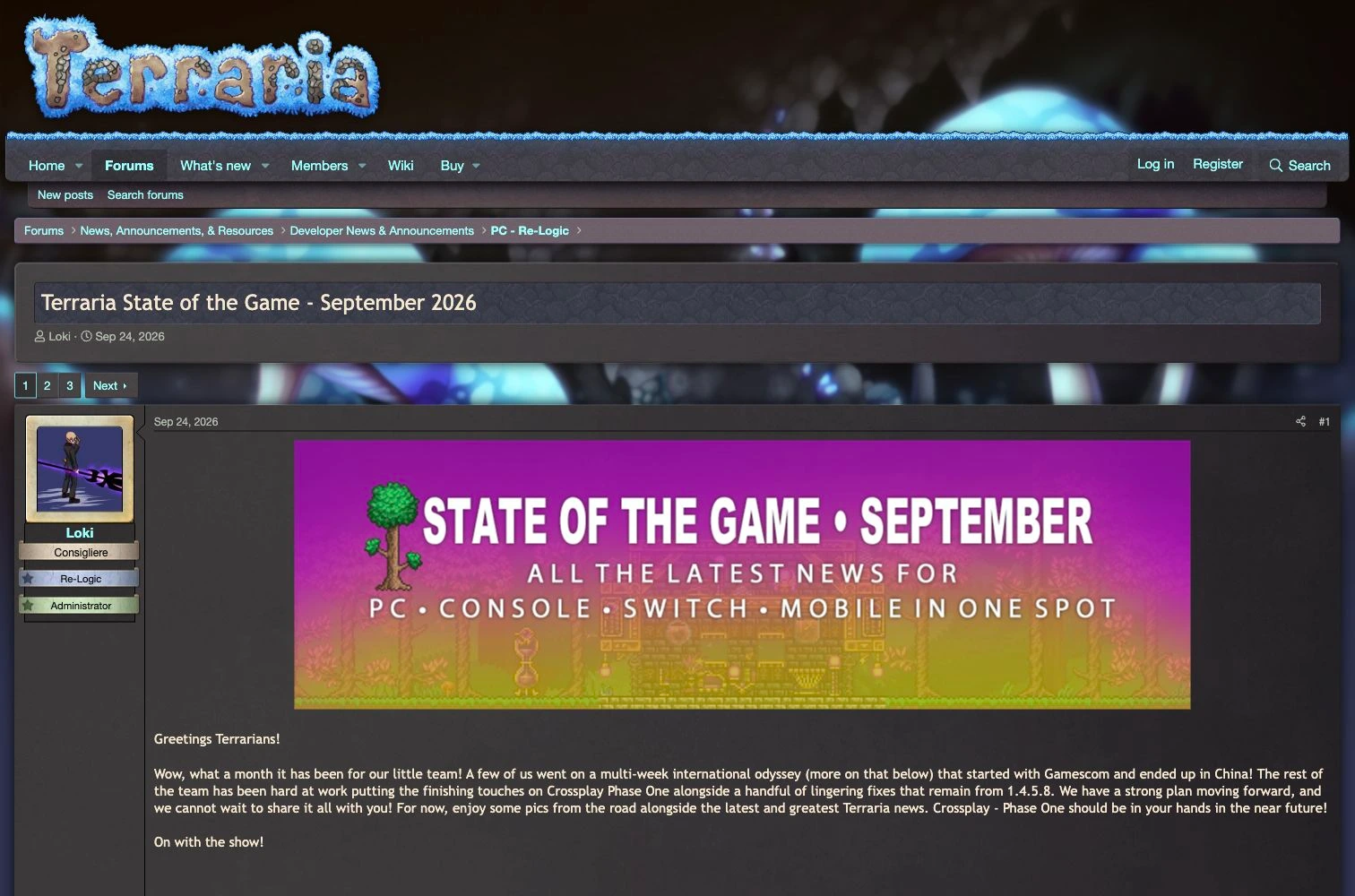
Source: Terraria Community Forums, September State of the Game, captured October 10, 2026. The developer introduction describes work on Crossplay Phase One; it is not a launch confirmation.
What the September post actually commits to
The developer section combines Re-Logic and DR Studios news and says platform-specific matters will be identified when needed. It describes Phase One submission as a near-future step, followed by an intention to bring Phase Two afterward. Those are development plans, rather than guaranteed dates.
For a player, the useful decision rule is simple: wait for a release statement, then check the platform instructions. Do not turn a phrase about progress into “Friday,” “this month,” or a promise that every platform receives the update simultaneously.
The September post also mentions remaining fixes following 1.4.5.8. That is another reason to avoid treating a new patch number as proof that the crossplay milestone has arrived. A maintenance patch can change the current game without satisfying the feature you are waiting for.
Keep a small comparison note for your group:
- The device or storefront each person uses.
- Whether each person is playing the base game or a modded setup.
- The version currently installed on each device.
- The official release post and the compatibility instructions it provides.
This note is more actionable than a generic countdown. A countdown cannot resolve a mismatch between an update available on one platform and an update still awaiting another release process.
tModLoader follows its own development path
The September announcement has a separate tModLoader section. It discusses the regular October 1 update for the 1.4.4 line and ongoing work on a 1.4.5 preview branch. The development issue linked by that team, tModLoader's 1.4.5 update information, tracks work and contributor tasks.
A preview branch is a development option; it is not equivalent to the ordinary stable release for everyone. If your current world uses mods, read the tModLoader usage FAQ and the team's release notes before deciding what to change.
For example, a friend sending “new Terraria update today” might mean a tModLoader monthly patch. Ask for the link and version. If your goal is base-game crossplay, that announcement answers a different question. Keep mod-tool notifications and base-game launch notifications in separate lists.
Use current video commentary as context
ChippyGaming's September 26, 2026 video below discusses what is next after the September development news. The YouTube page currently calls it What's next for Terraria; the search result also surfaced it under a 1.4.6-focused title.
It is useful for hearing a creator's explanation of the upcoming development, but it is independent commentary, with a paid promotion. It is not a Re-Logic release announcement or proof of a date. Verify any time-sensitive claim against the official post before relying on it.
Our Grounded 2 roadmap guide uses the same distinction between plans and released changes. Each game still needs its own official source; another game's update cadence cannot predict Terraria's schedule.
Get a native announcement first, then watch a precise condition
If you use Steam, start with the game's announcement feed and the notification options available in your Steam account. The official forum also provides a direct place to check development news. These are sufficient if you are happy to read the new posts yourself.
PageDog is useful when the thing you want is narrower than “any Terraria news.” On your Mac, open the official developer-news listing, select the visible announcement area, and describe the specific launch condition: “Notify me when an official announcement says Terraria 1.4.6 Crossplay Phase One is released, rather than being prepared or submitted.”
Include your platform in the condition if that distinction matters. A monthly post, merchandise announcement or unrelated hotfix should not count as the launch you want. If a title is too vague, inspect the linked post yourself; do not ask a check of the listing to infer a promise hidden on another page.
PageDog checks that selected visible region locally while your Mac is awake and connected, with hosted AI evaluating the captured condition. It does not predict a release date, install a game patch, enable crossplay or verify your multiplayer connection. Read the PageDog setup guide, and use precise conditions to reduce false alerts.
When an alert arrives, open the official announcement and confirm release status, supported platforms and any setup instructions. That is the point to update your group plan, rather than treating the notification itself as a compatibility test.