In this article
Check the model and product surface first
Anthropic's paid-plan context table, checked November 24, 2026, separates ordinary Claude chat, Claude Code and Claude Cowork. Do not transfer a number from one column of that documentation to another product surface.
For example, the table lists Fable 5.2 at 1M tokens in paid Claude chat and Opus 4.8 at 500K tokens there. Claude Code has its own table. The appropriate answer is therefore the row for the model and client you actually use, not one universal Claude limit.
| Question | What to record |
|---|---|
| Which product? | Claude chat, Claude Code or Cowork |
| Which model? | The selected model's exact name |
| Which plan? | The account or workspace plan |
| Which notice? | The exact limit or error shown |
| Which task? | The material and result you need next |
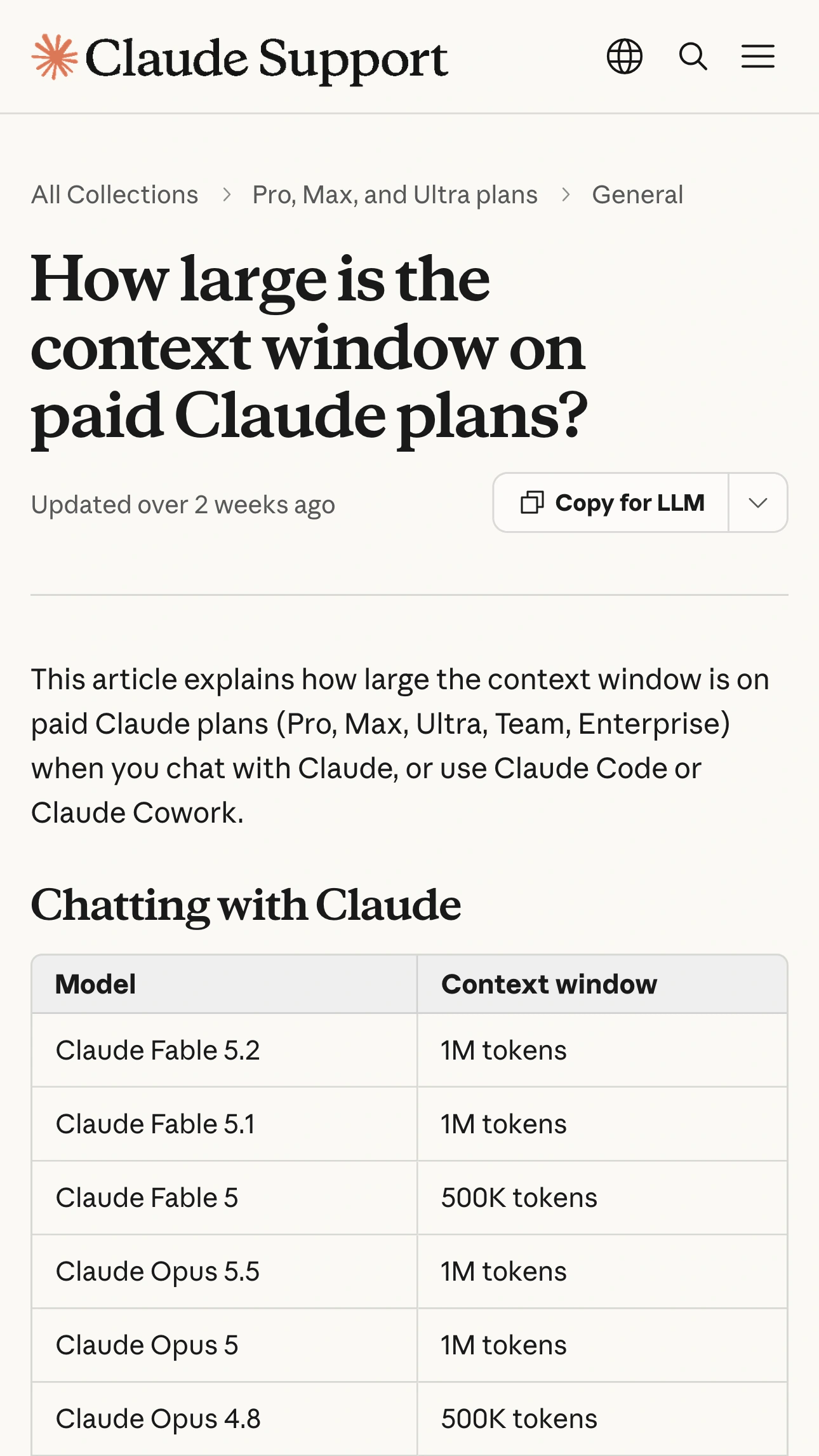
Source: Official documentation, captured November 24, 2026. Claude Support separates ordinary chat from Code and Cowork; the visible rows show why the selected model matters.
Treat these as investigation fields. This article does not claim that every account can select every model in the table. Confirm the available selection and the relevant plan conditions in your own account.
Distinguish length from usage over time
Anthropic's usage and length explanation distinguishes a conversation's working context from allowances over a period of time. A larger context window does not mean unlimited messages or unlimited work.
Read the actual notice before changing your workflow. A reset time points toward usage over time. A message that the input is too long points toward the amount of material being submitted. Copy the notice into your own troubleshooting record so a later retry can be compared with the same problem.
For an illustrative case, imagine reviewing a long policy document. You may have enough room to provide the relevant sections and still encounter a usage allowance after repeated analysis. Conversely, available usage does not establish that one enormous first message will fit.
Do not convert tokens to a guaranteed page count. A page containing a few paragraphs, a dense table and a long code listing represent different inputs. Identify the source sections you actually need rather than selecting files by page count alone.
Let automatic management work, then verify what matters
The help documentation describes automatic summarization for long conversations when code execution is enabled. It also says this can consume more usage and that very large initial inputs can still encounter limits.
A continuing conversation is not proof that every earlier detail remains equally prominent. Keep important decisions and constraints easy to locate, then inspect the next answer. If the work concerns a contract, specification or dataset, compare the result with the relevant original passage.
For an original example, suppose you are comparing two software requirements documents. One requires offline use and the other permits a network dependency. Your next prompt should identify that distinction explicitly rather than relying on a detail buried in an earlier discussion.
Ask for the proposed conclusion and its supporting source section. If Claude omits the offline requirement, correct that omission before asking it to rewrite the entire report. A focused check makes the error easier to diagnose.
Create a handoff that preserves decisions
Before starting a new conversation, write a small handoff for the next step. Preserve the current artifact or file separately so you are not depending on an AI summary as the only copy of your work.
| Handoff item | Useful content |
|---|---|
| Goal | The result the next step must produce |
| Decisions | Choices already accepted and their reasons |
| Constraints | Requirements that must remain true |
| Evidence | Source names and the exact relevant sections |
| Next action | One concrete operation to perform |
This worksheet is an original planning aid, not a claim that a particular chat was tested. Review the handoff against the original conversation and files. Remove discarded ideas that could be mistaken for accepted requirements.
For the requirements example, a useful next action is compare the two offline-use clauses and identify the unresolved conflict. Continue the analysis is too vague: it leaves the next conversation to guess which decision is still open.
Keep chat and coding-client instructions separate
The official Claude video below, published May 18, 2026, demonstrates context management in Claude Code. It discusses commands used in the coding client. Watch it for the principle of managing working context, not as evidence that those commands exist in ordinary Claude chat.
If your issue concerns a reusable procedure, the Claude Skill Creator guide covers testing instructions. If you are sending the resulting work to someone else, the artifact-sharing guide covers recipient access. Neither job is solved by citing a context-window number.
Reduce the next input to its purpose
Start the next step with the handoff and the source sections needed for that step. Keep general project guidance short, and distinguish permanent constraints from instructions for the current operation.
You do not need to paste every abandoned draft to explain one unresolved sentence. Identify the latest accepted version, describe the remaining decision and include the evidence needed to make it. Retain the full materials outside the conversation for later review.
Check the first response before proceeding through a long sequence. Does it use the intended version? Does it preserve the critical constraint? Does it answer the stated next action? Correct a mismatch while the test is small.
For new model changes, consult the Claude release-notes guide and the official table again. A historical video or saved screenshot is not a permanent guarantee of today's capacity.
Watch the capacity rule your workflow uses
If a workflow depends on a particular model's documented capacity, PageDog can monitor that selected visible row in Anthropic's context table on your Mac. Define a condition that the named model's context allowance changes, then reopen the source after an alert.
Checks run locally while the Mac is available; hosted AI receives bounded captured evidence when used by your plan. PageDog does not measure conversation tokens or extend Claude's context. Finish with the correct model/client row, the exact notice and a verified handoff for the work you need to continue.