In this article
Key facts
| Question | Current answer | Important caveat |
|---|---|---|
| How much is Supabase Free? | $0 per month | Limited to two active free projects; inactive projects may be paused. |
| How much is Supabase Pro? | From $25 per organization per month | Each project has its own compute charge. One Micro project is effectively included through $10 in compute credits. |
| Is every Pro project $25? | No | A Pro organization with three Micro projects is $45 per month before overages or add-ons. |
| Are usage limits per project? | Usually no | Variable usage such as egress and monthly active users is summed across the organization; compute is billed per project. |
| Can Pro overages be blocked? | Often | The spend cap is enabled by default, but it does not eliminate every possible charge. |
These are public US list prices and quotas checked on August 25, 2026. Taxes, currency conversion, annual commitments, custom contracts, add-ons, and future plan changes can produce a different invoice.
What each Supabase plan currently includes
Supabase's official pricing page lists four plan levels: Free, Pro, Team, and Enterprise. Free is for learning and small experiments. Pro starts at $25 per month, while Team starts at $599 per month and adds controls such as SSO and a longer log-retention window. Enterprise is custom-priced.
The most useful Free-versus-Pro comparison is not only the sticker price:
| Included resource | Free | Pro |
|---|---|---|
| Monthly active users | 50,000 | 100,000, then $0.00325 per MAU |
| Database size | 500 MB per project | 8 GB disk per project, then $0.125 per GB |
| Egress | 5 GB uncached + 5 GB cached | 250 GB uncached + 250 GB cached; then $0.09 and $0.03 per GB respectively |
| File storage | 1 GB | 100 GB, then $0.0213 per GB |
| Active projects | Two free projects | No fixed project cap, but each project adds compute |
| Backups | Not included | Daily backups retained for seven days |
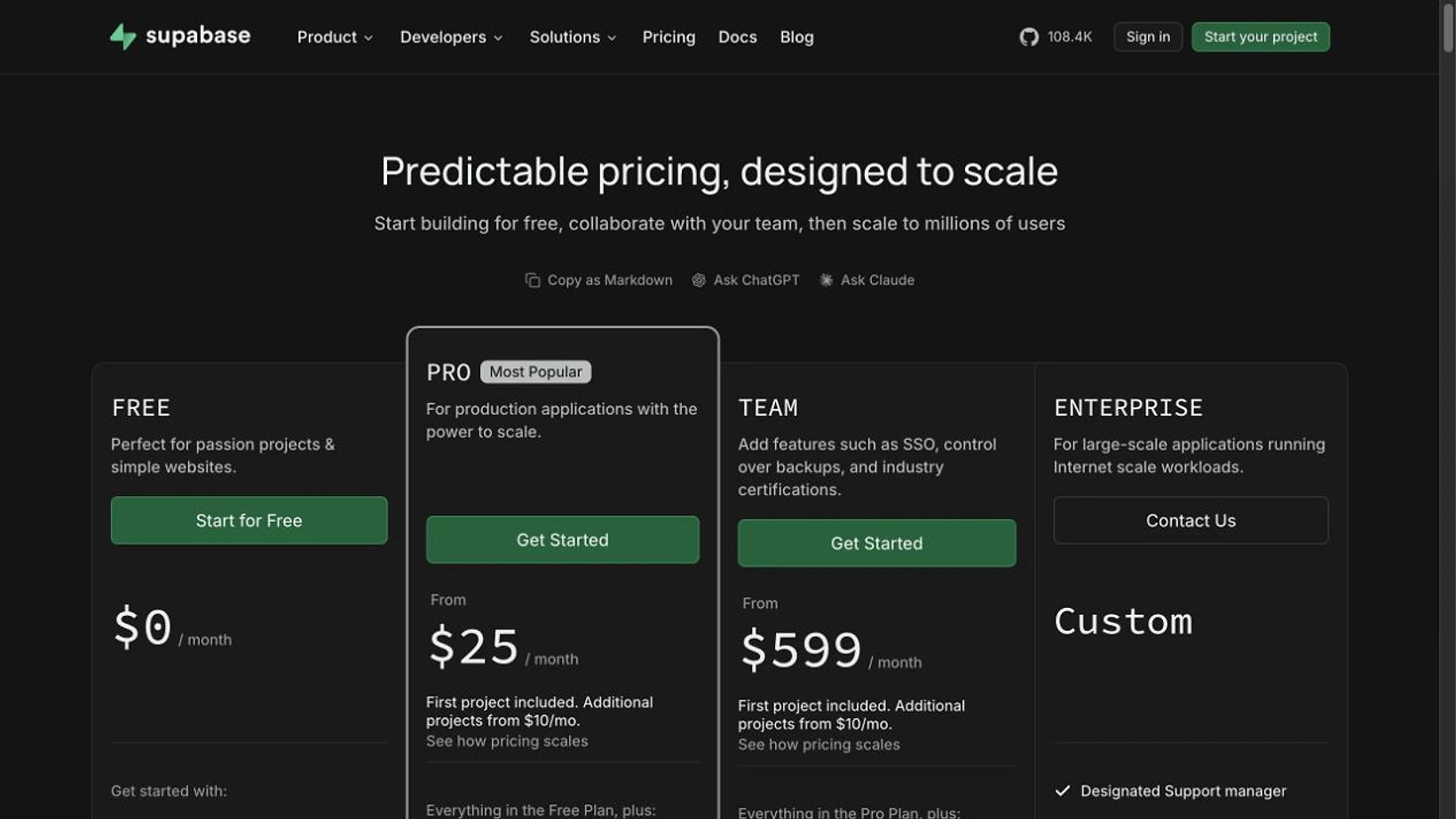
Screenshot: the official Supabase pricing page shows Free at $0, Pro from $25, and Team from $599. Captured 2026-08-25 from a device-scale-2 browser session. The browser bridge exported 1,265 pixels, so the image was deterministically resized and conventionally sharpened to 1,640 pixels without altering the interface or its content.
The billing guide explains the important boundary: a subscription belongs to an organization, not to an individual project. Usage allowances are pooled across the organization's projects, while compute is charged separately for every project.
Why a $25 Pro organization can cost more
Supabase separates the Pro plan fee from project compute. The first $10 of compute is offset by monthly compute credits, which makes one Micro project total $25:
$25 Pro plan + $10 Micro compute − $10 compute credit = $25 per month
A second or third project is not included in that same $25. Supabase's billing FAQ gives a three-project example:
$25 Pro plan + $30 for three Micro projects − $10 compute credit = $45 per month
That example still excludes add-ons and usage charges. Larger compute sizes and additional services can raise the total further.
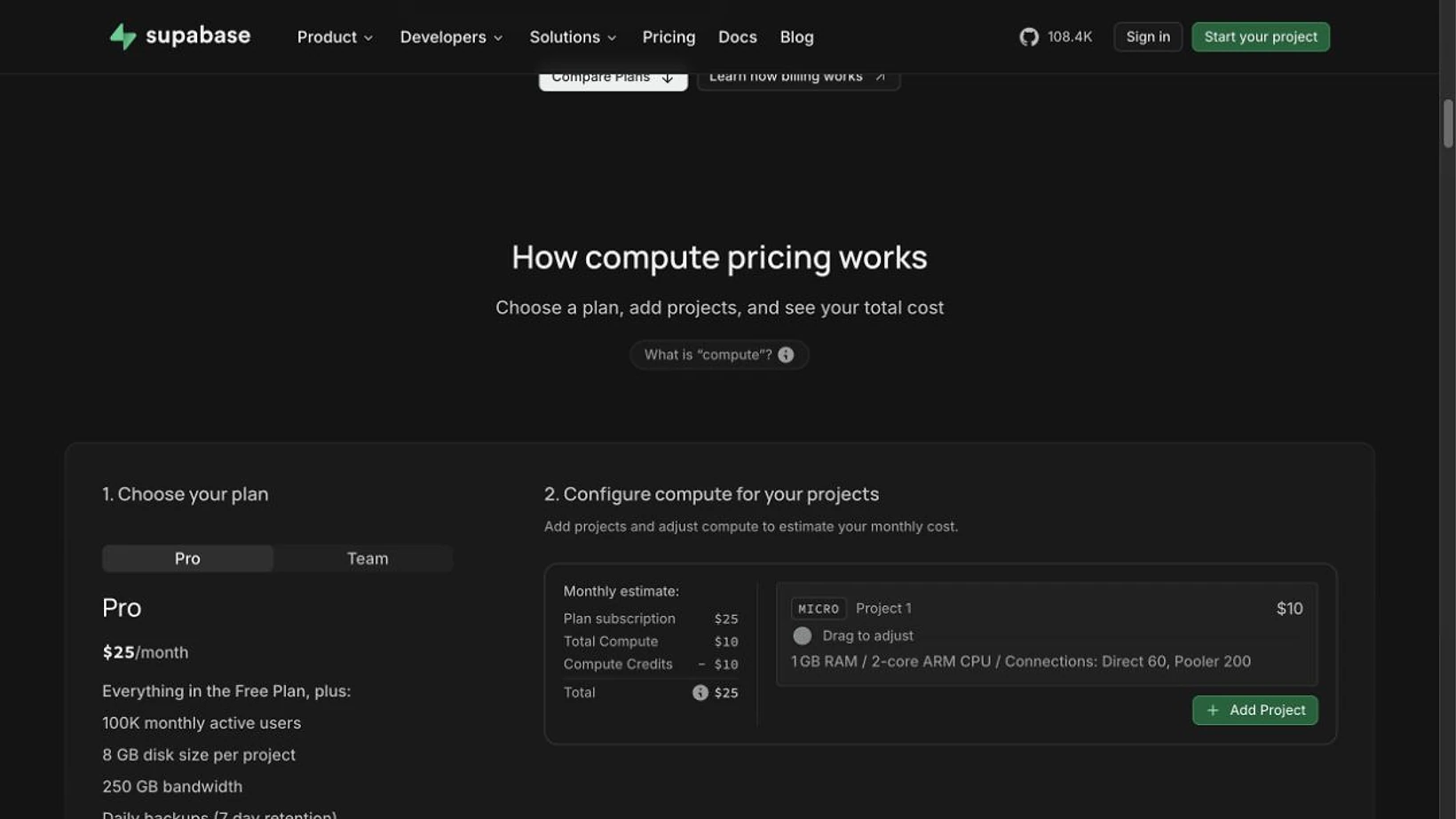
Screenshot: the Supabase pricing calculator makes the organization-plan-plus-project-compute formula visible. Captured 2026-08-25 from a device-scale-2 browser session. The 1,265-pixel browser export was deterministically resized and conventionally sharpened to 1,640 pixels without changing the visible values.
Eliana Jordan's February 7, 2026 video is a useful independent account of how infrastructure choices and operating costs feel in a real SaaS project. It is one developer's experience, not a pricing specification; use Supabase's live calculator and billing documentation for the current numbers.
Which costs are predictable and which can move
Your base plan and selected compute sizes are the predictable part. The variable part comes from usage and optional services.
- Monthly active users, egress, cached egress, storage, Edge Function invocations, and Realtime usage can exceed included quotas.
- Point-in-time recovery, custom domains, IPv4 addresses, and additional compute are separate add-ons or line items.
- Fixed subscription and compute charges are billed up front; metered usage is billed in arrears, as the monthly invoice guide explains.
- The Pro spend cap is enabled by default. Supabase's cost-control guide is the right source for what it blocks and which charges can still appear.
The practical mistake is to multiply $25 by nothing and call that the forecast. A useful estimate lists the organization plan, every project's compute size, expected usage above included quotas, and required add-ons as separate rows.
Choose a plan by workload, not by headline price
Use Free when you are learning, prototyping, or maintaining no more than two low-traffic projects and can tolerate an inactive project being paused. It is not a good production assumption if you need guaranteed availability or backups.
Use Pro when a production app needs daily backups, email support, higher quotas, and a spend cap. Start with the number of always-on projects: one Micro project can remain at $25, but additional projects change the baseline before traffic grows.
Use Team when governance is the deciding requirement—especially SSO, longer log retention, and organization controls. It is not a cheaper way to buy raw compute; the starting price reflects operational and security features.
Ask for Enterprise when you need negotiated support, compliance, scale, or contract terms that the public plans do not cover.
How to notice a Supabase pricing change without watching the whole page
First use Supabase's billing dashboard and spend cap for your own account. For public plan changes, PageDog can watch one stable visible region—such as the Pro price, included database size, or a specific overage row—and notify you only when that selected evidence changes. Save the exact URL and one condition per monitor; do not monitor the entire pricing page or treat PageDog as a billing meter. The workflow is local-first on Mac and reviews the visible before-and-after result. See the broader SaaS pricing changes guide, the guide to reducing false website-change alerts, or PageDog documentation.
Best for: a stable public price, quota, or plan label that could change between invoice reviews.
Main limitation: PageDog sees the public page region you select; it cannot calculate private account usage, taxes, credits, or a negotiated contract.
A practical Supabase pricing rule
- Count organizations and active projects separately.
- Add the plan fee and every project's compute price.
- Subtract only credits shown in the current official calculator.
- Estimate pooled usage across the organization, not per project.
- Add required services and verify the spend-cap behavior.
- Reopen the live calculator before launch or a large traffic change.
For one small production project, $25 can be a realistic baseline. For multiple projects, larger compute, or meaningful overages, it is only the first row of the estimate.
Research sources
- Supabase pricing — live plan prices, included quotas, overage rates, and calculator.
- Billing on Supabase — organization billing and project-versus-organization usage rules.
- Supabase billing FAQ — active-project limits and worked multi-project examples.
- Your monthly invoice — fixed versus usage-based billing timing.
- Why I Stopped Using Supabase for My SaaS — independent experience, published February 7, 2026.