In this article
Start with your store’s As-is inventory
Open IKEA US As-is online, choose Stores, and select the location you can actually visit. Search inside the As-is area, rather than relying on the main site’s regular-product search. The two searches answer different inventory questions.
IKEA’s 2023 US launch announcement introduced online browsing and reservations for gently used and other As-is products. That announcement explains the service’s origin. Use the current page and the particular listing for today’s offer.
| Check | Why it matters |
|---|---|
| Selected store | An item in another store does not establish availability where you will collect it |
| Full description and measurements | A product-family match can be a component rather than a complete piece |
| Condition and defect information | The listed discount applies to that particular item |
| Reservation instructions | An online listing is different from a completed hold |
Read past the product-family name
Our October 29, 2026 test selected IKEA Brooklyn and searched BILLY. The page returned one item: a height extension unit, 32×11×14 inches, oak effect, with minor damage to its finish. It was not a complete BILLY bookcase. The listing showed a previous price of US$35.00 and an As-is price of US$14.99.
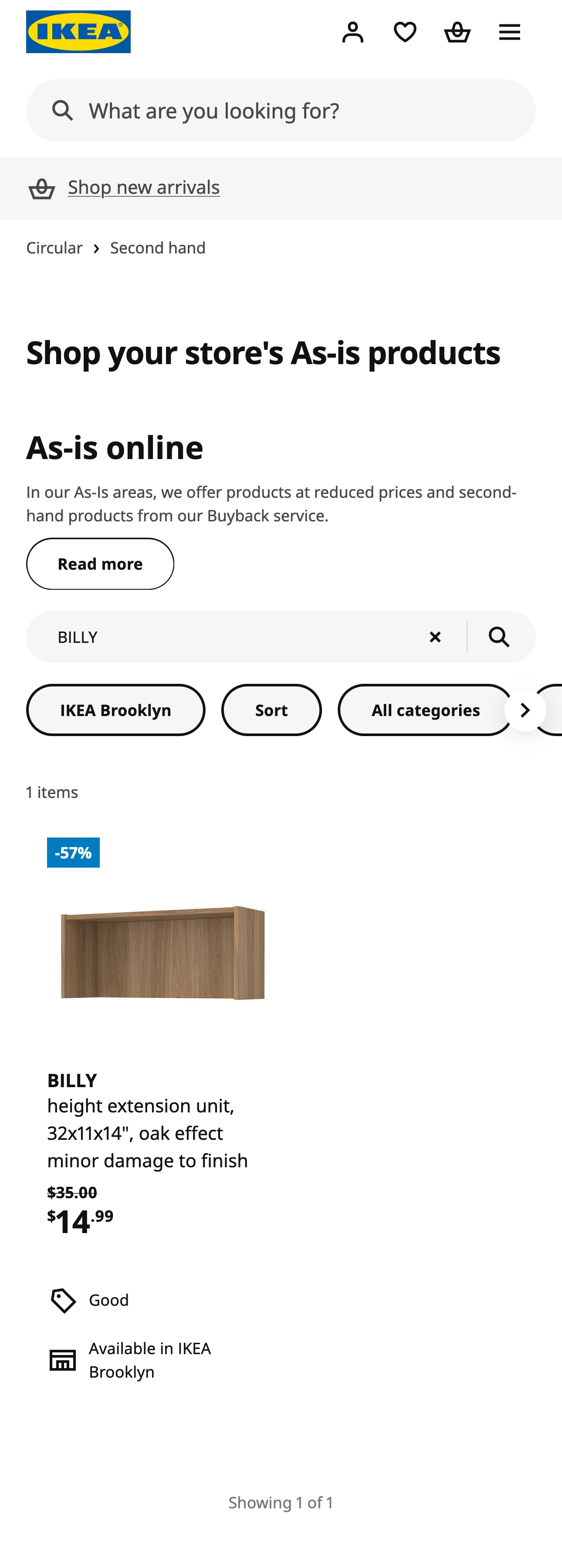
Source: IKEA US As-is online, Brooklyn BILLY search, captured October 29, 2026. This is a dated observation of one store’s listing, not a live stock promise.
That example gives you a useful rule: treat the family name as a starting point. Read the noun that follows it. An extension, door, frame or shelf may be the component you need, but it should not be mistaken for a complete piece of furniture.
The discount in this example is US$20.01, about 57% of the displayed previous price. It is a saving only if you need that component in that condition. A low price does not solve a measurement mismatch, and the description matters more than a familiar product photograph.
We opened the item and found its condition explanation, handling-damage note, article number and a login link to reserve. We also reloaded the filtered search URL: Brooklyn and BILLY remained selected. You should repeat that check for your own store and search before relying on a saved link. A URL that opens the general page without your filters is not the same search.
Separate browsing, reserving and buying
The current US page’s How does it work? and What is the full customer journey? sections explain the sequence: use an IKEA Family account, choose and reserve a product, collect it at the selected store, then complete payment at checkout. In our public test, we could view the search and item detail without signing in; reserving required login.
IKEA describes a 48-hour reservation period and says an expired reservation’s product goes back online. Read the actual confirmation and the selected store’s business hours when planning collection. We did not place a reservation, make a purchase or test collection, so this article does not claim an end-to-end buying test.
Do not assume that every As-is item you see while walking through a store must appear in the online results. Our evidence establishes what the online search displayed, not a complete count of the physical department. If a particular part matters to your project, verify it with the store instead of treating an empty result as proof that nothing suitable exists anywhere.
REISSUED’s July 2023 video follows an online As-is shopping experience while finding a PAX wardrobe component for a bedroom project. It illustrates why the exact component matters. The historical interface and that creator’s purchase are not evidence of current Brooklyn inventory.
Video: REISSUED, July 2023. An independent shopper’s experience; current US reservation and return rules come from IKEA’s linked pages, not this older demonstration.
Inspect condition before accepting the item
On the current US As-is page, IKEA tells customers to review uploaded defect photos and comments. Use those alongside the measurements and item description. A condition label such as Good is less specific than a note explaining the actual damage.
The same page states that As-is products, including items reserved online, are excluded from its Return Policy. Check the current US return policy and As-is terms before buying. The page also says some As-is products may qualify for Buy Back & Resell; that is a separate service, not a standard right to return this purchase.
Before travelling, write down the item description, selected store and reservation information. At collection, compare the actual item with the listing and assess whether the recorded condition works for your use. For a different location question, our IKEA new locations guide distinguishes a full store from planning and pickup formats.
Watch for a suitable listing, without reserving automatically
If you keep reopening the same filtered search, PageDog can check a selected visible area locally on your Mac for a precise outcome. In the Brooklyn example, “BILLY appears” would be too broad: the extension already matched that name.
A more useful condition would be “Notify me when the visible Brooklyn BILLY results include a complete bookcase, rather than only an extension unit.” Select an area that keeps the store, search and relevant item descriptions together. Review what PageDog can actually see before starting; it cannot evaluate listings outside the captured area or prove that an unseen item is absent from the whole catalogue.
Our guide to monitoring website changes explains that selection step. The local execution guide explains why your Mac needs to remain available for checks. If the site needs login or attention, complete that step yourself.
A page alert is a prompt to review the listing. It does not reserve the item, prevent another customer taking it, inspect damage or purchase anything. Return to IKEA to check the details and follow its native reservation process yourself.
The decision sequence is simple: choose the right store, identify the exact piece, inspect its condition and terms, then reserve only when it fits. Use an optional watch for a later visible match, rather than accepting every result that shares the family name.
Research sources
IKEA US As-is service and FAQ, the US launch announcement, and As-is terms.