
In this article
Start with the performance you can actually attend
Use the official Royal Ballet and Opera events listing to find the production, then choose the performance date. A production can have several performances, different casts and different availability. A ticket appearing for another evening does not solve a fixed-date visit.
Write down the date, start time, venue, number of seats and maximum total you can spend. If two seats together are essential, include that in your decision before following an availability alert. A page showing one available seat has not established that your party can attend together.
This guide concerns the Royal Opera House in Covent Garden, London, and information checked on November 6, 2026. Do not confuse it with the Royal Court Theatre, Sydney Opera House or a cinema screening. Similar search results can describe entirely different ticketing schemes.
The RBO Help Centre includes separate questions about purchasing tickets, finding availability, sold-out performances and access tickets. Use those current answers first. For a requirement that the public booking page cannot resolve, ask the Box Office rather than treating a general-purpose monitor as a substitute for venue assistance.
Treat sold out as a state to investigate
A sold-out notice describes the published availability at that moment. It is not a promise that seats will return, and it does not tell you how many other people are waiting for the same date. RBO provides routes for existing ticket holders to return tickets or request resale, but those rules do not create a guaranteed supply for a prospective buyer.
The current ticket exchanges, resales and refunds page distinguishes returning tickets for account credit more than 24 hours before a performance from offering them for resale through the Box Office closer to the event. It also states a £4.50 administration fee per ticket. That is a charge associated with the returning holder’s route, not a published price for buying a returned seat.
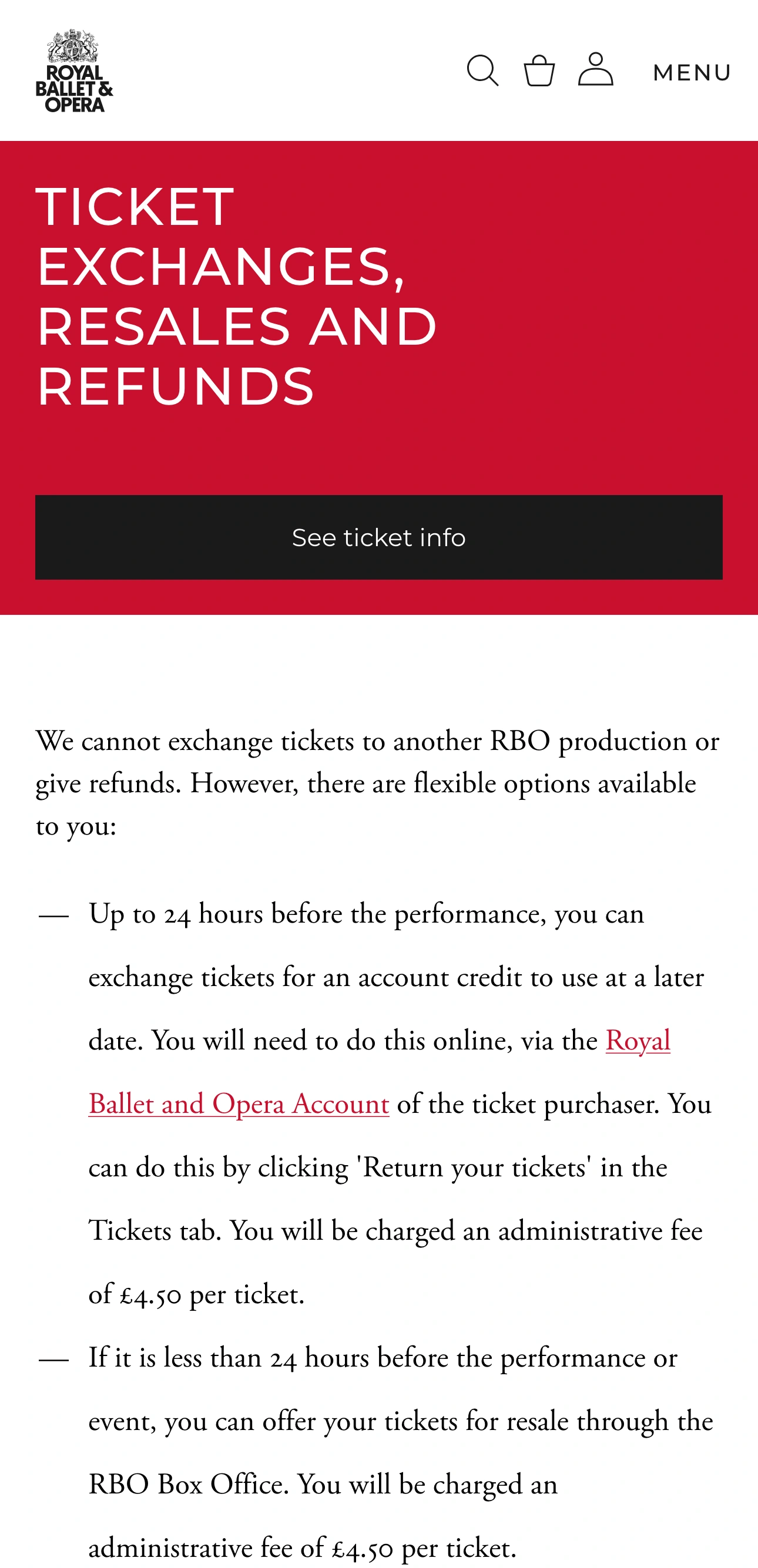
Source: Royal Ballet and Opera ticket policy, captured November 6, 2026. This shows the return policy, not live seat availability.
Avoid turning the 24-hour policy boundary into a supposed restock time. It explains what the original holder can request. It does not establish that tickets drop at a particular hour, or that refreshing at that hour will secure them.
Check what returned tickets actually mean
RBO’s terms and conditions of sale explain that returned tickets are resold subject to demand and availability in the relevant theatre area and price band. Resale is not guaranteed, and returned tickets may be withdrawn. Special cases and performances at other venues have their own restrictions.
For a buyer, the useful consequence is simple: inspect the actual offer when it appears. The existence of a returns policy is not evidence that your date currently has seats. The policy also cannot establish that two seats are adjacent or that a particular seat has the view you expect.
Before paying, check the total in pounds sterling, the date and time, the venue, the seats and any displayed view restrictions. RBO’s terms state that some tickets are market-priced, so do not assume an older screenshot establishes the price you will see. Read the current basket and checkout information yourself.
After buying, use the venue’s ticket information to find your digital ticket. This June 2025 official walkthrough shows access after purchase, not available seats or a returns schedule.
Do not rely on an old rush-ticket timetable
Search results and older discussions can mention Friday Rush or other last-minute schemes. Check that a current official page still offers the named scheme before planning around a day, hour or price copied from an old article.
During preparation of this guide, our text-fetch attempt for the old Friday Rush URL did not return readable content. That technical failure does not prove that a scheme exists or has ended. We therefore do not publish a current Friday Rush timetable or price. The current Help Centre and venue booking information are the appropriate places to resolve it.
Apply the same distinction to recommendations for a different London theatre. A National Theatre rush release is not evidence about Royal Opera House availability. Keep the venue name attached to every timing claim.
Use a clear availability checklist
A useful comparison is between your requirements and what the actual page establishes:
| Requirement | Evidence you need |
|---|---|
| One particular evening | The selected performance date and start time |
| Two people together | Two adjacent acceptable seats in the booking flow |
| A spending limit | The current total for the seats you intend to buy |
| A suitable view | The selected seat’s description and any restriction notice |
| An accessible booking | The venue’s current access-ticket instructions or assistance |
A general newsletter can help you hear about venue news and ticket announcements. Do not assume that a newsletter subscription is an alert for two adjacent seats on one particular evening unless the venue explicitly describes it that way. The venue’s Help Centre says it does not offer a waiting list for sold-out performances. It directs buyers to check the official page again for returned tickets.
Where a PageDog watch might fit
If the official options meet your requirements, use them. A local watch is a possible fallback when an exact public performance page shows a meaningful availability state you would otherwise keep reopening. First verify that the selected performance survives reloading the page. A link that returns to a production overview without your date is not a reliable baseline for that evening.
For example, the official Manon listing showed separate date and time rows on November 6. The production-level Buy tickets link led to that date section; the link alone did not establish availability for any particular row.
On your Mac, open that verified page in PageDog and select the visible performance or availability region. Define a condition tied to what the page can actually show, such as a named date changing from sold out to an explicit booking option. Do not ask it to confirm two adjacent seats if the selected region contains no seating evidence.
PageDog checks the selected visible region locally on your Mac. It does not buy tickets, choose seats, reserve inventory or bypass a queue, sign-in problem or security challenge. Keep the Mac available for scheduled checks and inspect the actual booking flow after any useful alert. A notification is evidence to investigate, not a ticket.
The PageDog documentation explains the local workflow. Our website update-checking guide also explains why a generic page change and the specific result you need are different signals. You can find the app on the Mac download page.
Know the limits of this guide
We checked public venue policies, not live seat inventory. We did not book, return or resell a ticket, and have not completed a monitored-performance baseline. No current seat count, price or release time is claimed. Before relying on a watch, confirm that your actual page exposes the right date and state, then use the venue’s current instructions to complete any purchase yourself.