
In this article
Start with the current US instructions
Open IKEA US spare parts before following an old tutorial or paying a third-party parts seller. Our November 5 check found a clear notice under Order small spare parts: the online ordering system was currently unavailable, and customers should ask a co-worker at their closest IKEA store for assistance.
That notice changes the next step. A guide that tells you to enter a part number into an online form may describe a service that existed when the guide was written. It does not establish that the form is available today. Equally, an unavailable ordering system does not mean IKEA has stopped supplying every spare part or that your particular part is permanently discontinued.
This article covers the United States page. Other countries can have different instructions and ordering systems. Check the country selector before treating any screenshot, delivery estimate or ordering method as applicable to you.
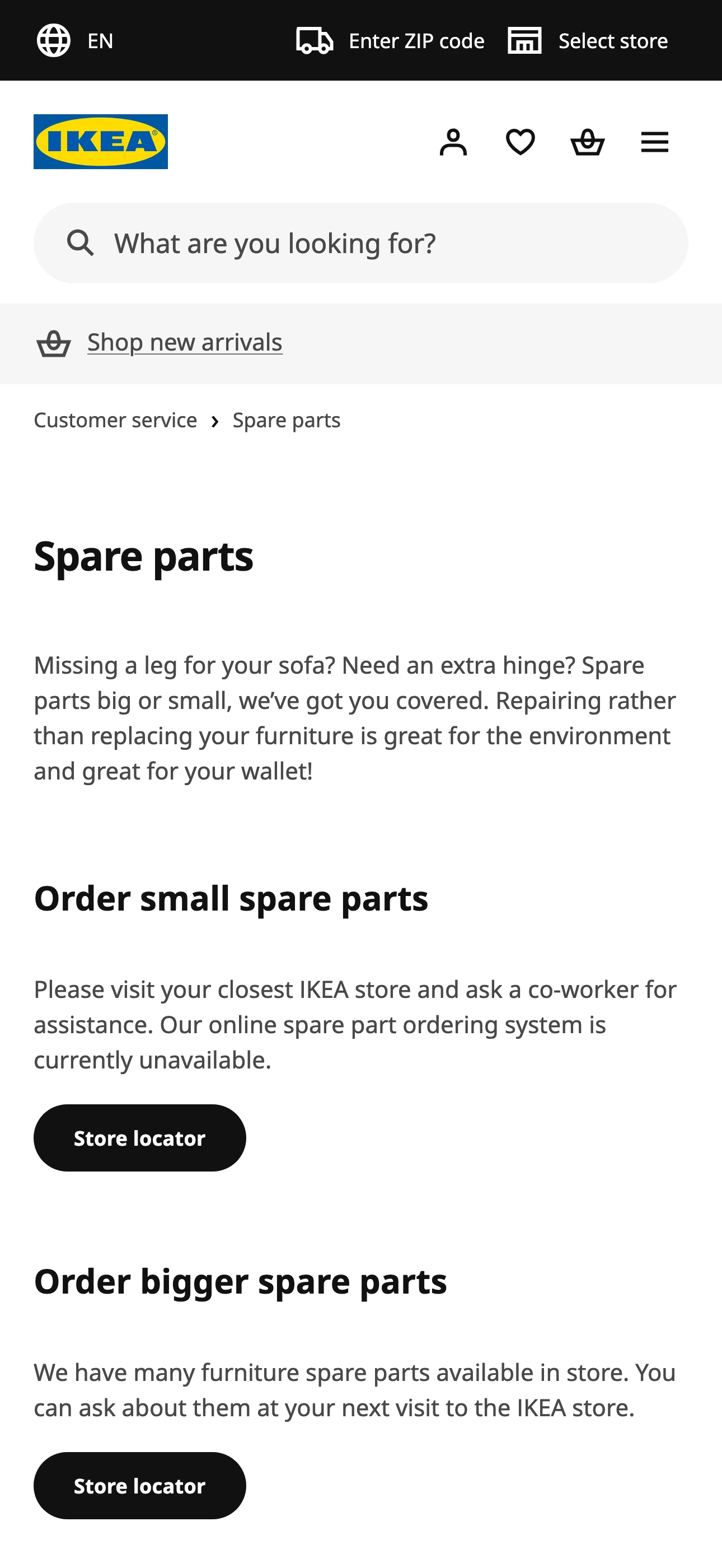
Source: IKEA US spare parts, captured November 5, 2026 in Firefox at native 3× density. The image is an ordinary crop of the source. It establishes the displayed service notice, not the availability of an individual part.
Separate three different replacement jobs
A missing screw, a broken furniture panel and an appliance component are different requests. The current page separates them rather than promising one universal catalogue.
- Small furniture hardware: Follow the current small-spare-parts instructions and ask in store while online ordering is unavailable. The notice does not tell you whether a particular screw or hinge is stocked locally.
- Larger furniture components: Ask a store about the specific part. Not every panel, leg or drawer is available separately.
- Appliance components: Use the appliance-parts partner named by IKEA. A furniture part number does not identify an appliance component.
IKEA currently directs appliance customers to its Encompass partner page. Follow that link from IKEA’s official page and identify the appliance before looking for a component. A familiar brand name alone does not establish compatibility with your model.
For larger furniture parts, the US page says many are available in store and advises asking during a visit. It does not publish a guarantee for every product or component. If the journey would be inconvenient, use the current IKEA US contact options to ask what information the store needs before travelling.
Prepare enough information to identify the part
Start with the exact product and the relevant assembly instructions. Record the product name and article number, then locate the missing or damaged component in the instructions. If a separate part number is printed beside it, keep that number with your request. Do not substitute a furniture article number for a hardware identifier without checking which one is being requested.
A practical preparation list is:
- Product name and article number, if available.
- The instruction step or diagram showing the component.
- Any part number actually printed in that diagram.
- A clear photograph and useful measurements when identification is uncertain.
- Your country and the store you can reasonably visit.
This is a way to make the conversation more precise, not a claim that these details guarantee a replacement. A co-worker may need more information, and some components may require a different route. For damaged or safety-critical furniture, ask for appropriate assistance rather than guessing that a similar-looking fitting is interchangeable.
IKEA’s missing-parts help article describes small selections at customer-service desks and postal assistance when local stock is unavailable. Read it alongside the current ordering notice. A general help article should not override a newer, explicit limitation on the ordering page.
The Savvy Professor’s June 2024 tutorial illustrates how to identify a part in the assembly instructions. Use it for that identification step only. The online ordering steps are historical and do not establish current US availability.
Do not confuse replacement parts with As-is inventory
A second-hand furniture listing can sometimes be a component rather than an entire product, but it is a separate buying route. Our IKEA As-is online guide explains why an item bearing a familiar furniture-family name may actually be an extension or accessory.
As-is inventory is not proof that IKEA’s spare-parts service has the same component, or that an item can be supplied as new replacement hardware. Check measurements, condition, collection location and the exact description. A discounted item solves the problem only when it is the component you need and its condition is suitable.
Likewise, do not treat a normal furniture stock alert as confirmation that a missing screw is available. Product inventory, individual spare-part availability and the status of an online ordering service are three different visible states.
When a PageDog alert can help
If you can use store assistance now, start there. A page monitor is useful when you specifically want to know whether the public online ordering service becomes available again. It cannot see a store’s internal parts inventory or answer a request that has not been published on a webpage.
On your Mac, open the official US spare-parts page in PageDog, select the visible Order small spare parts section, and define the outcome precisely. For example: “The US small-spare-part section explicitly offers online ordering again.” This is more useful than asking whether anything on the whole page changed.
Check that the selected section still contains the right country’s instructions when you reopen or reload the page. If the site changes its layout or shows a consent or attention screen, resolve that state before relying on the watch. A missing sentence alone is not sufficient evidence that ordering has reopened; you want an explicit usable ordering route.
PageDog checks the selected visible area locally on your Mac and evaluates the condition. It does not order the part, contact the store, reserve inventory or bypass a challenge. The Mac must remain available for scheduled local checks. You can read the PageDog documentation before setting up a watch and use the Mac download page if that local workflow fits your needs.
Use a dated result, not a restock promise
The useful result from our check is specific: the US public ordering page displayed an unavailable-service notice on November 5. We did not place an order, request a replacement, inspect store inventory or test delivery. No reopening date was shown, so this article does not predict one.
Keep the distinction when checking again. If online ordering returns, inspect the current instructions and your actual part request. A service becoming available is the beginning of the ordering process, not confirmation that the exact component is in stock or that a replacement has been approved.