In this article
Start with the official passholder page
For the current answer, open Universal Orlando’s Epic Universe passholder page and follow its account-setup and FAQ link. On October 2, 2026, the FAQ still says details about annual passes including Epic Universe will come later.
That statement supplies neither an on-sale date nor an annual-pass price. A projected year in a search summary, a visitor survey or a social post should not become a booking assumption. If repeated Epic visits are essential to your plans, buy only on the basis of the admission described in the product currently being sold.
For announcements, Universal offers an official email signup. Start there if general resort news is enough. An email subscription is a way to hear from Universal; it is not a promise of a dedicated alert for one future pass change.
Four products that are easy to confuse
| Product | Admission to verify |
|---|---|
| Existing annual or seasonal pass | Read its named parks and benefits. A three-park label alone does not establish Epic access. |
| Passholder one-day add-on | A selected Epic date with the linked pass and stated terms, not unlimited visits. |
| Multi-day ticket | Named parks for a set number of days, without assuming annual-pass benefits. |
| Separately ticketed event | Its own date, hours and conditions, not ordinary daytime or annual admission. |
Universal’s annual-pass comparison and its regular ticket products answer different questions. Read the park names, not just the park count or the word “pass.” A three-park holiday ticket and a three-park annual pass need not describe the same combination.
Universal’s 2026 multi-day-ticket announcement introduced three-, four- and five-day options involving Universal Studios Florida, Islands of Adventure and Epic Universe, with an option to add Volcano Bay. Those are holiday-ticket choices. The announcement does not, by itself, establish an Epic-inclusive annual pass.
This distinction matters most when comparing several visits. Write down the actual days you want and the parks you will enter. Then compare products that cover that itinerary. Counting “three parks” in two product names is not a like-for-like comparison.
How the current one-day add-on works
The official FAQ describes an online sequence: activate the annual or seasonal pass at a Universal Orlando park entrance, link it to your Universal account, then use the eligible ticket banner in the account. Buying a new pass online is not the same as completing that activation step.
The add-on is dated and non-transferable. Universal requires the linked pass and photo ID for entry. The FAQ also permits buying a visit date after the pass expires, provided the pass is valid when the add-on is purchased. Check the current terms before relying on that exception for your own dates.
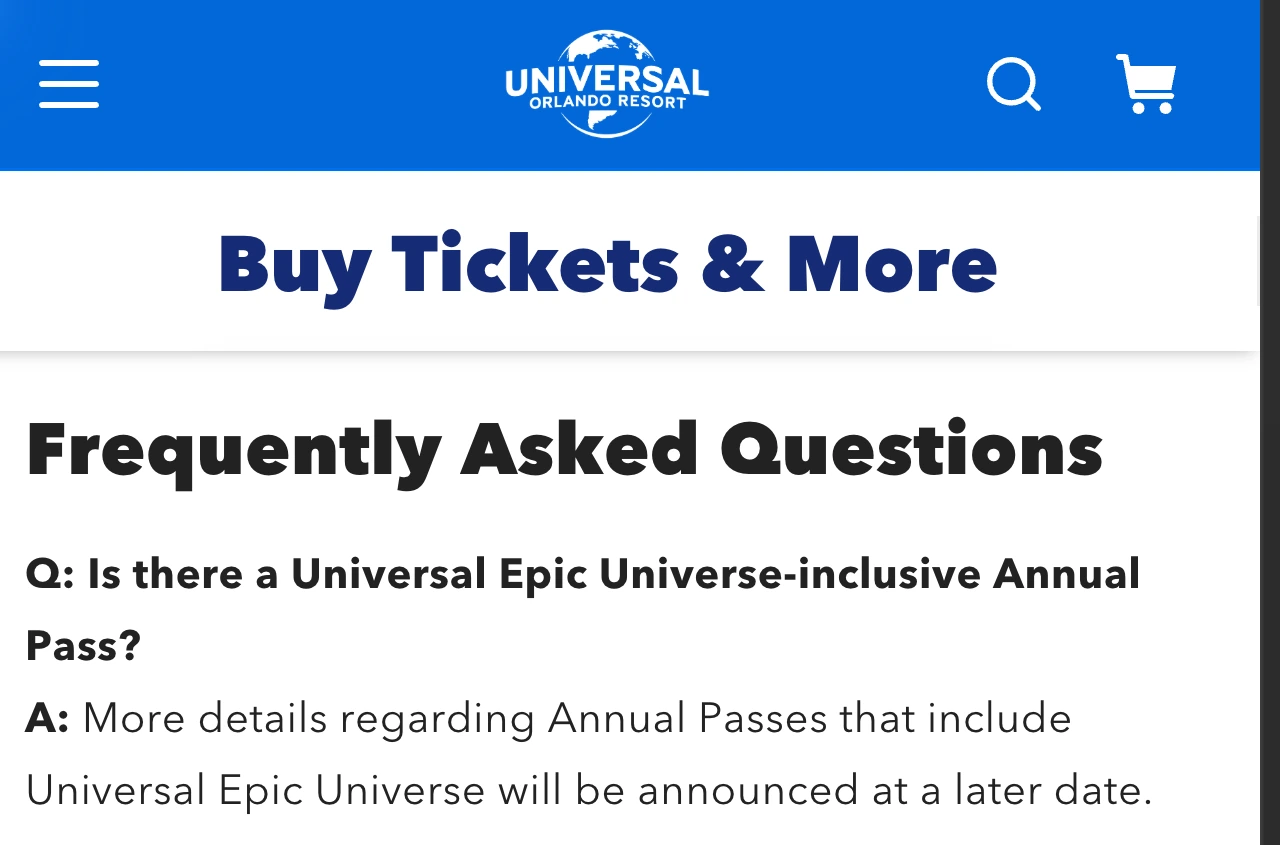
Source: Universal Orlando’s Epic Universe passholder FAQ, captured October 2, 2026. The answer distinguishes a future inclusive pass from the available one-day add-on.
The practical checkpoint is simple: if you cannot see the eligible offer, verify activation and account linking using Universal’s instructions. Do not treat a missing banner as proof that a future annual pass has sold out. These are different products and different problems.
For example, suppose you want one Epic day this autumn and several possible visits next year. The dated add-on can address the autumn day if you meet its terms. It cannot settle the future visits. Keep those undecided until an available ticket or pass explicitly covers them.
Why “passholders get access” can be an incomplete answer
A headline can be accurate about an add-on offer while leaving the central annual-pass question unanswered. Inside the Magic’s September report uses an access headline, then describes one-day tickets. Read the admission unit in the article and verify it against Universal’s page.
Use three labels when saving an update: source, product and effective date. A survey about possible options belongs in a research or speculation note. A product page with named parks and purchasable dates belongs in your planning record. Neither a survey nor a headline substitutes for the latter.
Universal’s historical introduction makes the physical distinction easier to picture: Epic Universe is a separate park with its own themed worlds.
Published by Universal Orlando on January 30, 2024, before the park opened. Use it for park context; its opening-era presentation does not establish today’s ticket or annual-pass rules.
Watch for the specific announcement you need
If general resort email creates too much unrelated news, a narrowly selected public-page watch can help. The useful question is whether Universal has published the missing pass details, rather than whether any word on its website changed.
On your Mac, open the official FAQ in PageDog. Select the visible question about an Epic-inclusive annual pass and its answer. A practical condition is:
Notify me when this answer announces an annual or seasonal pass that includes Epic Universe, with an on-sale date or a way to buy that pass. A one-day add-on or event discount does not count.
Run a manual check to confirm the selected answer survives reload. If the important information moves to another page, review the selection rather than expecting a watch on this paragraph to discover every announcement across the resort website.
PageDog checks the selected visible area locally on your Mac. Keep the Mac awake, online and the app running. It does not monitor in the cloud while your Mac is asleep, bypass a login challenge, book admission or buy a pass. A notification is a reason to revisit the official terms, not proof that your preferred dates or benefits are included.
Our guide to monitoring website changes explains the broader workflow, and reducing false alerts covers keeping unrelated promotions outside your selection.
Until Universal publishes the missing terms, separate today’s dated visit from future repeat admission. That keeps a useful one-day offer from becoming an unsupported year-round promise.