In this article
Key facts
| Question | Short answer |
|---|---|
| Is there one complete Claude changelog? | No. Claude Apps, Claude Platform, Claude Code CLI, and Claude Code desktop have separate update surfaces. |
| Where are general Claude app updates? | The Claude Help Center release-notes page. |
| Where are Claude API updates? | Claude Platform release notes, with deprecations checked separately before a migration. |
| Where are every Claude Code fix and patch? | The full Claude Code changelog and GitHub releases, not the weekly digest alone. |
| How often should you check? | Match the source to your risk: weekly for general awareness, per release for a production dependency, or only when a stable visible condition changes. |
This source map was checked on August 22, 2026. Release pages can change after that date, so reopen the linked official source before making a migration or security decision.
Where Claude release notes actually live
The phrase “Claude release notes” hides several different products. Start by choosing the surface that can answer your question.
| Official source | What it covers | Use it when you need |
|---|---|---|
| Claude Help Center release notes | Claude app, plan, admin, connector, and broad product announcements | A plain-language record of changes people see in Claude |
| Claude Platform release notes | Claude API, client SDKs, Console, headers, and platform behavior | A developer-facing change that may affect an integration |
| Claude Code: What's new | Curated weekly themes with demos and links | A readable summary of the changes most likely to affect a workflow |
| Claude Code changelog | Individual Claude Code versions, fixes, and smaller improvements | The exact version in which a behavior changed |
| Claude Code desktop changelog | Claude Code-specific changes in the desktop app | A desktop UI or desktop-only behavior; bundled CLI changes still belong in the CLI changelog |
The split is deliberate. The Platform page points app users to the Help Center and Claude Code users to its changelog. The Claude Code weekly digest likewise tells readers to use the full changelog for every bug fix and minor improvement.
The general Claude notes are a product timeline, not a patch log
On August 22, the Help Center page led with an August 6 entry for skill and plugin security scanning, followed by July entries such as the Claude Opus 5 launch and self-serve HIPAA configuration. Those are broad product and administration changes rather than a line-by-line software build history.
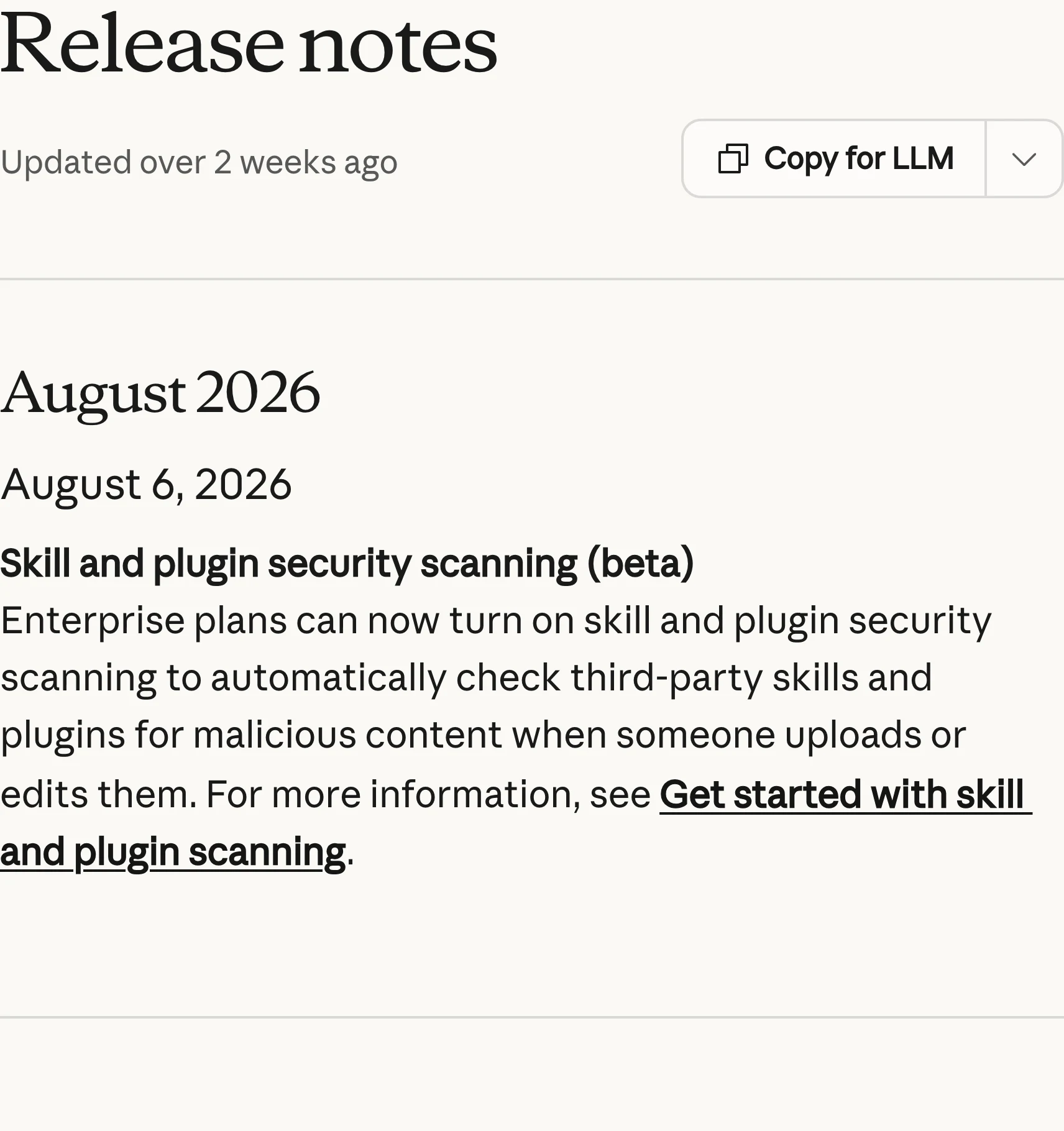
Screenshot: the official Claude Help Center release notes show the current month-by-month product timeline. Captured 2026-08-22 at native 4× device scale and cropped without alteration.
Use this page when the question sounds like “Did Claude add this feature?” or “Did an admin setting change?” Do not assume that silence here means the API, CLI, or desktop app was unchanged.
Claude Code has a digest and a full version history
Claude Code's What's new page is an editorial layer over the underlying releases. Its Week 32 entry grouped versions 2.1.220 through 2.1.224 and highlighted cross-session messaging, self-hosted environments, permission-mode changes, and a VS Code focus view.
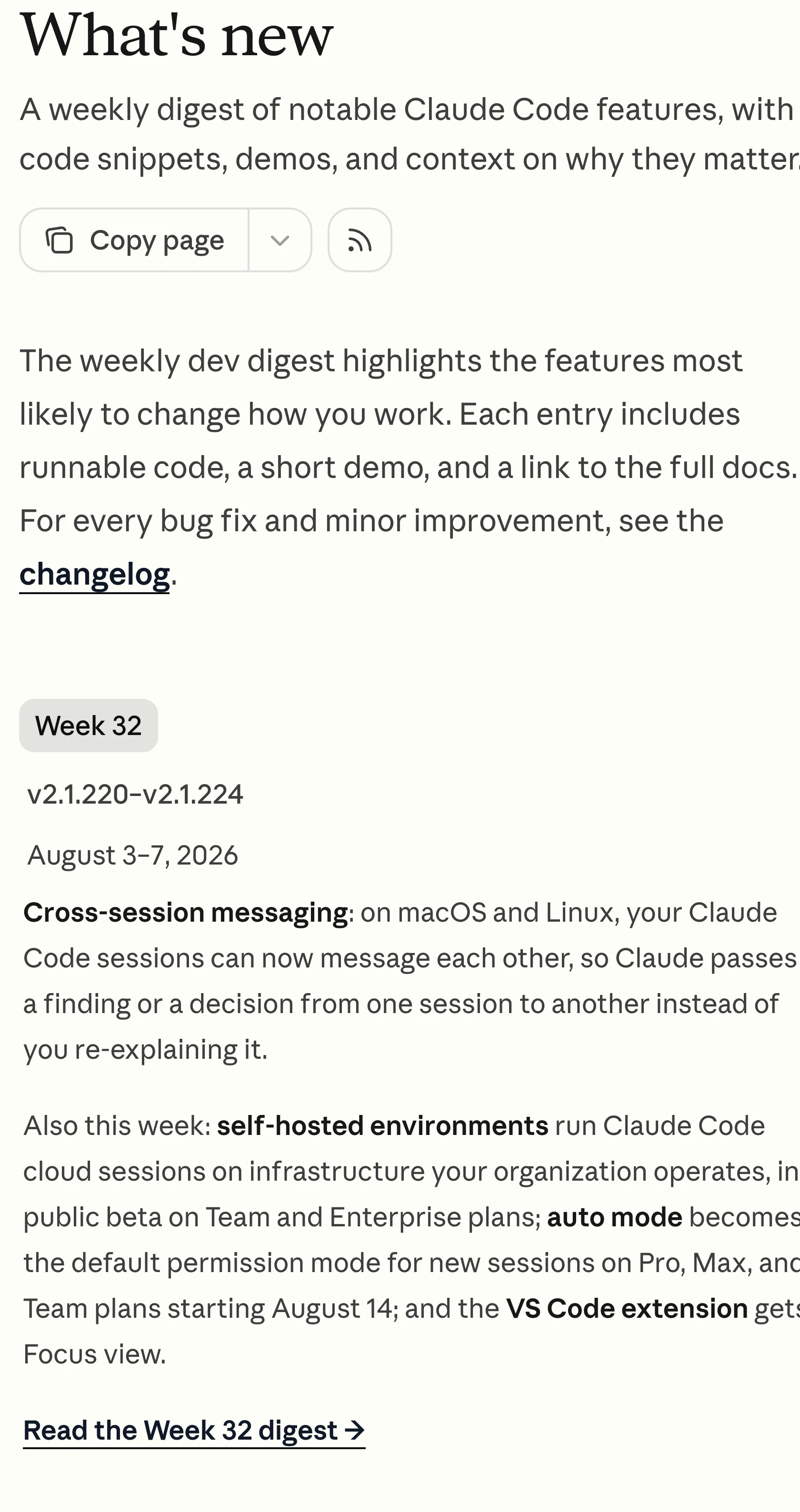
Screenshot: the official Claude Code weekly digest explains which changes matter and links to deeper documentation. Captured 2026-08-22 at native 4× device scale and cropped without alteration.
That page is easier to scan, but it is not exhaustive. The full changelog is generated from the repository's CHANGELOG.md and had already reached version 2.1.239 on August 21. If a bug appeared after an update, compare your installed version with the full log or GitHub releases, not only the latest weekly summary.
The desktop changelog is another boundary worth keeping. It records Claude Code-specific desktop behavior; it does not duplicate every change in the CLI bundled with the app. A desktop problem can therefore require checking both logs.
Anthropic's official Claude channel published the Code with Claude 2026 opening keynote on May 6, 2026. It gives a first-party view of the headline features discussed at the event, but it is event coverage rather than a version-complete changelog; use the official logs above for exact implementation details.
Video: Claude, published 2026-05-06. Useful for seeing how Anthropic frames major Claude Code changes together; the limitation is that the keynote does not replace the weekly digest or full version history.
Which page should you monitor?
Choose the smallest official surface that owns the decision:
- Claude app or organization policy: watch the relevant month or heading in the Help Center notes.
- API behavior: use Platform release notes first, then verify model deprecations and the documentation for the affected endpoint.
- Claude Code workflow: read the weekly digest for context and the full changelog for the exact version.
- Desktop-only behavior: check the desktop changelog, then the CLI changelog if the issue crosses that boundary.
This prevents two common mistakes: reacting to an app announcement as if it changed the API, and treating a curated weekly digest as a complete patch history.
For Claude Code, GitHub also exposes a standard releases Atom feed. A native feed is the better first choice when it covers the exact source you need. Third-party release aggregators can be convenient, but they add another delay and interpretation layer; keep the official release page as the authority.
Use PageDog only for a narrow visible condition
PageDog is useful when an official public page has no alert for the specific change you care about. Select one stable visible region—such as the newest month heading, a deprecation date, or a named feature block—and describe the outcome that matters. A focused watch is less noisy than watching the entire documentation site; our guide to reducing false website-change alerts explains why.
The check runs locally on your Mac while PageDog is running and the computer is awake and online. It does not merge the five changelogs, monitor account-only content, bypass access controls, or decide whether an update is safe for your code. The official source still carries that decision. For a careful setup, follow a respectful way to watch a page and record the baseline date with the website last-updated checklist.
A practical update routine
For ordinary awareness, review the Help Center notes and Claude Code digest once a week. For a production dependency, subscribe to the closest native release feed and add a focused watch only for a stable condition the feed does not express—such as a named retirement date moving closer or a documentation block changing from beta to generally available.
When an alert arrives:
- Open the official page rather than acting from the notification alone.
- Confirm the product surface, date, and affected version or plan.
- Follow the linked migration or feature documentation.
- Test the change against your own account and environment.
- Save the source and check date in the decision record.
This is also why visible update dates need context. A page can refresh its metadata without changing the section you care about, while a changelog can add a small entry without changing its top-level date. Monitor the meaningful text, not the footer or the page's generic “updated” label.
Frequently asked questions
Where are the official Claude release notes?
There are several official locations. Claude app changes are in the Help Center, API and Console changes are in Claude Platform notes, and Claude Code changes are split across a weekly digest, full CLI changelog, and desktop changelog.
Are Claude Code What's new and the changelog the same?
No. What's new is a curated weekly digest of notable workflow changes. The changelog contains individual versions, bug fixes, and smaller improvements. Use the digest to understand significance and the changelog to identify the exact release.
Do Claude app updates apply to the API?
Not automatically. A feature in Claude's web, desktop, or mobile app may not exist in the Claude API. Check Claude Platform release notes and the linked API documentation before changing an integration.
Can PageDog notify me about every Claude release?
PageDog watches one selected visible region per watch; it is not a hosted Claude-release aggregation service. Use native feeds for complete release streams and PageDog for a narrow public-page condition that lacks a suitable native alert.
Bottom line
There is no single complete Claude changelog. Pick the official page that owns the product surface, use a native feed when one exists, and monitor only the stable visible condition that remains uncovered. That is more reliable than treating every “Claude update” as the same event.
Research sources
- Claude Help Center release notes — app, organization, and broad product announcements; checked 2026-08-22.
- Claude Platform release notes — API, SDK, and Console changes; checked 2026-08-22.
- Claude Code What's new — curated weekly digest; checked 2026-08-22.
- Claude Code changelog — complete version history generated from the repository changelog; checked 2026-08-22.
- Claude Code desktop changelog — desktop-specific changes and scope boundary; checked 2026-08-22.