
In this article
Start with the item, size and color
The quickest useful answer is on the product you want, not a general drop calendar. On the U.S. site, Lululemon’s Product Availability help explains how to request a back-in-stock notification: sign in, choose the sold-out color and size, then select notify me. Look for the confirmation email after registering.
Write down the product’s full name, color, size and length before you start. “Black leggings” is too broad if you actually need a particular model in size 6 with a 25-inch inseam. A different length returning does not solve that problem, even when the product photograph looks identical.
If you cannot find the control, check that you selected the unavailable combination and signed in. Then consult the current help page or support. Do not assume that a missing button means the item is discontinued, that it will return tomorrow, or that another country’s site has the same inventory.
Tuesday drops and restocks answer different questions
During our September 23, 2026 visit, the U.S. site’s banner advertised new gear every Tuesday. The availability instructions below it described variant-specific notifications without giving a universal restock hour. That distinction matters when a search result offers a confident timetable.
| What you want to know | What to check |
|---|---|
| Has my existing size returned? | The same product, color, length and size |
| Has a new color launched? | The current new-products collection |
| Can I collect it nearby? | Store inventory for the selected variant |
| Is there a markdown? | The current price of that exact variant |
A new color can launch while your preferred older color remains unavailable. A markdown can appear without replenishing every size. Treat these as separate states instead of interpreting any Tuesday update as the restock you need.
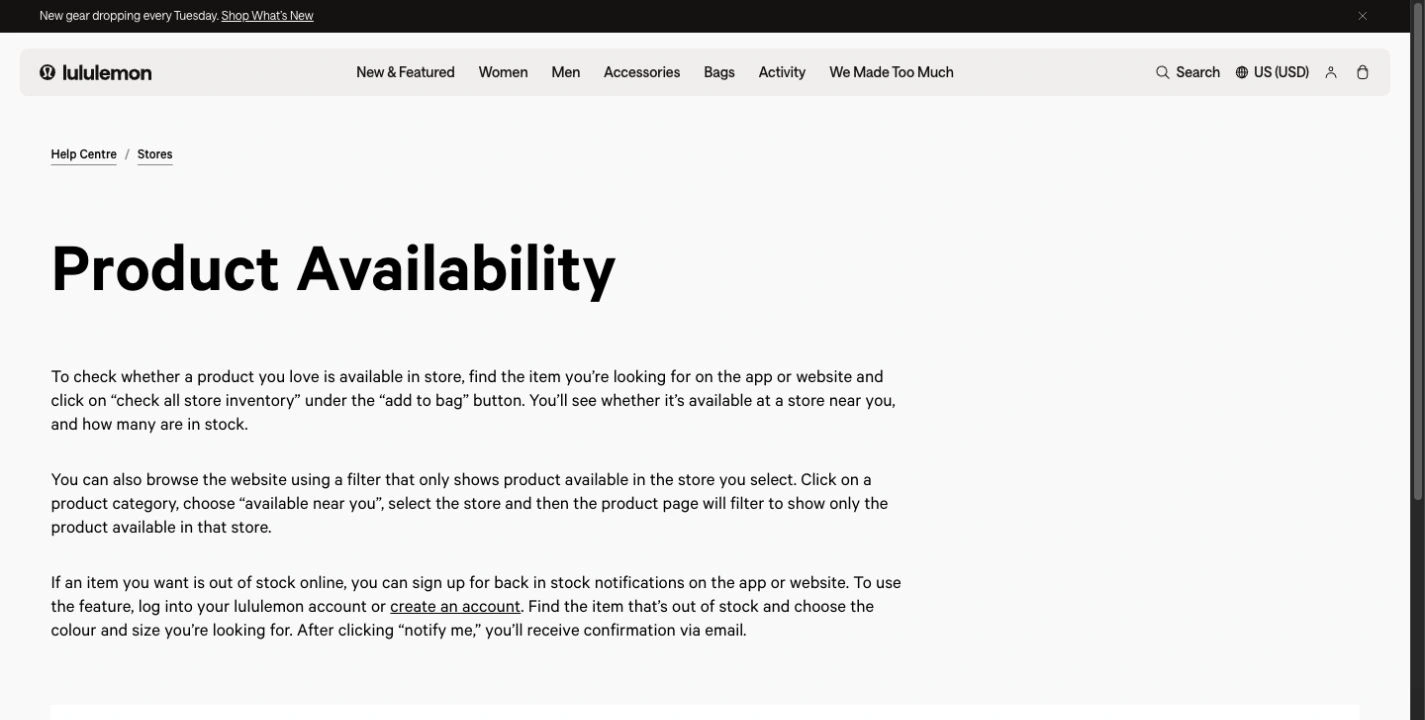
Source: Lululemon Product Availability, captured September 23, 2026. The banner concerns new gear; the instructions concern selected-item availability. Open the full-size image.
This is a dated check of the published guidance, not a stock-arrival experiment. We did not measure warehouse update times or notification delivery speed. There is no basis here for promising that a particular item will return at midnight, on Tuesday afternoon, or within a fixed number of days.
Check nearby stores before waiting online
The same official help page describes check all store inventory beneath the purchase area. It also explains the available near you category filter. Use the store you can actually visit and the correct variant; online availability and one store’s availability are different answers.
Lululemon’s app overview also describes checking whether your size is in store and saving favorites. A saved favorite is useful for finding the page again. Do not treat saving it as confirmation that a back-in-stock notification is active.
For example, suppose a jacket is unavailable for delivery but appears at a nearby store in another size. That is an alternative to assess, not a successful match. If the correct size appears, follow the store’s current collection or purchase instructions before making a special trip. A stock display is not a reservation.
Use notification emails for the right purpose
Lululemon’s email-signup instructions concern messages about product drops, collaborations and events. Those general messages are different from requesting the return of a selected size and color.
Keep the confirmation for the exact item, check the inbox you used, and open the product again when an alert arrives. The final page still needs to show the right variant as available. Neither an email nor a screenshot holds an item while you decide.
A useful personal rule is to decide what substitutions you would accept in advance. If only one color works, ignore other colors. If several lengths work, keep them as separate candidates instead of changing the meaning of “back in stock” after every notification.
When a separate page monitor helps
Use the native notification when it covers your need. A separate monitor is most useful when you need a particular visible condition that the native option does not describe—for example, availability for the selected variant at one store, provided that view survives reopening the page.
Distill explains how to select part of a webpage. Its official April 29, 2024 tutorial shows the selection-and-monitoring process:
This is an alternative-tool demonstration, not a Lululemon test or a PageDog walkthrough. The interface is older; use current written instructions for its controls. The useful idea is to select the evidence that answers your question, rather than a rotating product gallery or an entire storefront.
Watch a precise availability condition on your Mac
If you already use PageDog, first reopen the product page and confirm that the required color, size and store remain visible. Only then select the availability area and describe the result, such as: “Notify me when this size 6 jacket is available at the selected store.”
PageDog checks the selected visible area locally on an awake, online Mac and uses hosted AI to evaluate the condition. Review its saved evidence before acting. It cannot guarantee a restock, reserve stock, buy the item, or bypass login and CAPTCHA challenges. If the page resets the variant or store on each visit, that view is not a reliable monitor target.
Keep the selection narrow enough to exclude recommendations, but wide enough to retain the product identity and relevant availability label. Our guide to monitoring one part of a webpage explains that tradeoff. If decorative changes keep triggering attention, review ways to reduce false change alerts.
A practical restock checklist
Confirm the exact variant and shopping region. Register the native notification and retain its confirmation. Check realistic nearby-store options. Decide your acceptable alternatives and how long you want to wait. When a notice arrives, return to the live page and verify the same combination before buying.
That sequence is more useful than planning around an unverified hour. It also gives you a clear stopping point: once you have bought the item or chosen an alternative, retire the watch instead of collecting unrelated alerts.
Research sources
- Official availability and account guidance: Lululemon’s Product Availability, app overview and email-signup pages linked above.
- Alternative monitoring workflow: Distill’s current selection documentation and its dated official video.
- Observed evidence: the U.S. help page captured September 23, 2026; other regions and live inventory may differ.