In this article
Start with Amazon’s own job alerts
Use the official Amazon job-alert signup before adding another service. It asks for an email address or phone number and a ZIP code. The page says alerts about available roles in your area are sent each week; after signup, use Manage alert preferences to choose the work you want.
That weekly cadence matters. Signing up does not establish an instant notification for every newly posted shift, and the signup page does not promise you a place. Keep your preferences aligned with the jobs you could actually accept.
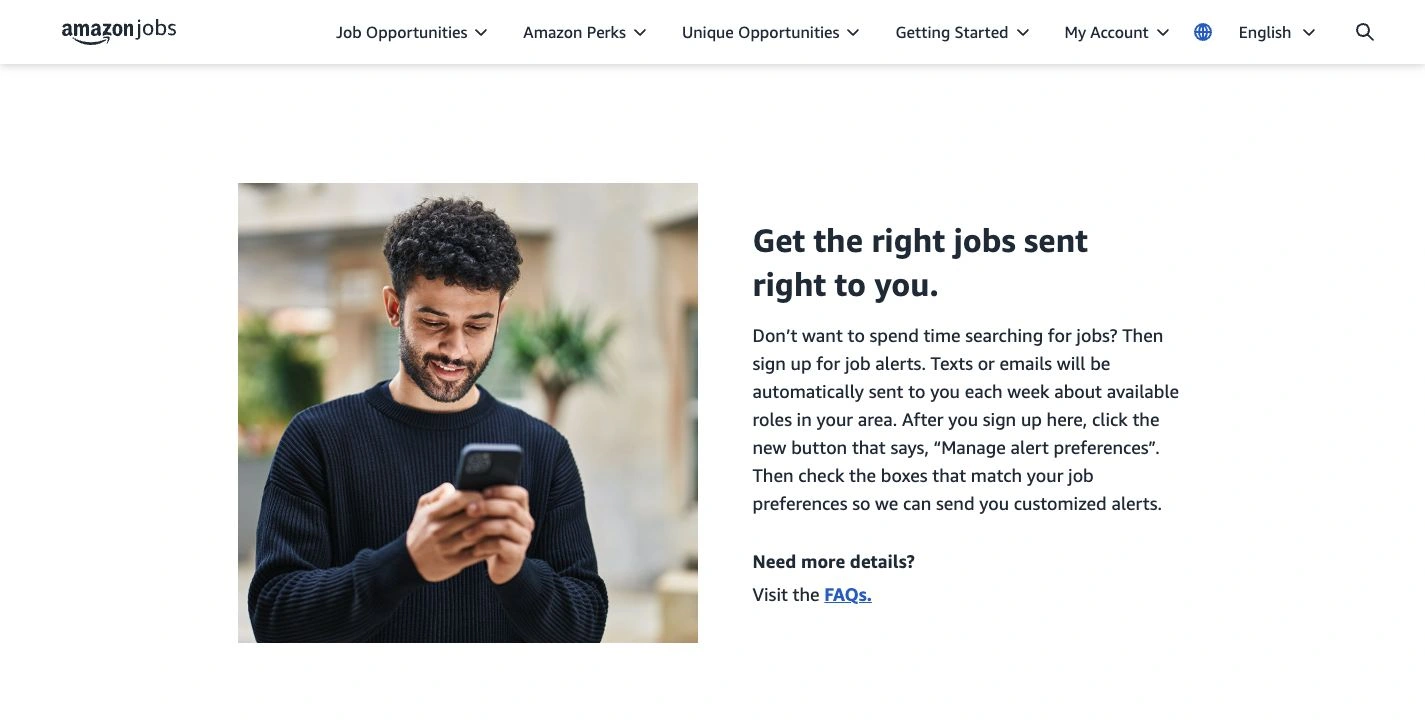
Source: Amazon Job Alerts, captured September 24, 2026. The official wording describes weekly delivery and customizable preferences. Open the full-size image.
If you choose SMS, read the signup terms and any message or data charges shown there. This guide concerns the US hourly hiring site. For another country or a different job category, begin with Amazon’s hourly jobs by type and region rather than assuming the same signup route applies everywhere.
Separate three different clocks
Search results for this question can mix vacancy publication, alert delivery and the hours an employee would work. Only the first tells you when an opening became available to apply for.
| Time you see | What it means | What it does not establish |
|---|---|---|
| A job appears in search | An opening is visible for the current search | The next opening will appear at the same hour |
| A weekly job alert arrives | Amazon sent matching opportunities | The listed vacancy was created at that moment |
| A shift starts at a stated hour | The working schedule of that role | A daily vacancy release time |
A forum comment describing a successful Friday application can be useful local experience. It is not a national schedule. During our research, applicants reported conflicting days and hours, while the official alert guidance focused on location and preferences. We found no basis there for promising that refreshing at midnight or on a particular weekday will work.
The practical response is to keep the official search available and use alerts, rather than reorganizing your sleep around an unsupported rule. If you receive a location-specific announcement from Amazon, use that announcement’s actual details.
Check the location and job type before checking more often
Open Amazon’s job search and confirm the area you intend to work in. Review the job category and any filters you have applied. A narrow result is useful only if it matches your real availability.
For example, suppose you want a part-time warehouse role within a reasonable commute. A full-time opening farther away is not a match merely because it appeared today. Decide your acceptable location, hours and schedule first, then evaluate each result against those requirements.
Do not confuse a public opening with the status of an application you already submitted. Amazon’s hiring FAQ treats application status, start dates, pre-hire appointments and job alerts as separate questions. Follow the application’s own instructions when you are already in that process.
For a visual walkthrough, the EBRPL Career Center, part of the East Baton Rouge Parish Library, published this updated application guide on June 16, 2026:
The tutorial helps you recognize the search and application workflow. It is an independent library resource, not an Amazon announcement or evidence of a fixed vacancy-release hour. Follow the live Amazon application guide if a screen or instruction differs.
A welcome email is not a matching-job alert
Amazon’s FAQ distinguishes confirmation from subsequent notifications. Email subscribers should receive a welcome message on the day they subscribe. If it never arrives, an incorrectly entered email address is one possible explanation.
If the welcome message arrived but job alerts did not, Amazon says there may have been no posting matching your preferences. The FAQ also notes that some jobs and shifts fill quickly. Silence therefore does not prove that the subscription failed, and an old alert does not prove the role remains open.
Use a short diagnosis:
- No confirmation: review the address or the SMS confirmation steps.
- Confirmation but no matches: compare your preferences with the live search.
- An alert for a role that has disappeared: revisit the official search for current availability.
- A problem inside an existing application: use the relevant hiring support route.
This avoids repeatedly changing a working alert when the real issue is availability.
When a selected-page check can help
The remaining task is narrower than “find any Amazon job”: notice when a repeatable search view contains a role you could accept. A page monitor may help with that visible condition while you are using your Mac. It should supplement the native alert, without a promise to beat it.
First reopen the search URL and check whether the same location and filters return. If the site loses those choices, requires repeated navigation or presents a security challenge, resolve that before relying on a monitor. A captured homepage is not evidence about your selected local jobs.
In PageDog, open the page, select the visible results area and include enough context to identify the location and role. An illustrative condition is: “Notify me when this selected list shows an available part-time warehouse role in the location displayed above it.” Only use that condition if those details are actually visible together.
Run a check and inspect its saved capture. Our selected-area monitoring guide explains the basic verification steps. If unrelated banners or different locations dominate the result, revise the selection before scheduling more checks.
Know what the monitor cannot promise
PageDog loads and captures the page locally on an awake, online Mac, then uses hosted AI to evaluate your written condition. It does not automatically apply, reserve a shift, bypass CAPTCHA or keep checking from the cloud while your Mac is unavailable.
An interval is not an instant-delivery guarantee. With a 30-minute interval, a vacancy appearing just after a check could wait nearly 30 minutes for the next observation, plus processing and delivery time. It could disappear before then. Do not use a faster interval as a guarantee of being first.
After an alert, open Amazon, read the current role details and complete any application yourself. Once you have the outcome you need, stop the watch. For work with a published application window rather than recurring local vacancies, our NASA Pathways guide explains that different timing problem.
Research sources
- Native notifications and missing alerts: Amazon’s job-alert page and hiring FAQ, checked September 24, 2026.
- Finding and applying: Amazon’s regional hourly directory, live job search and application guide linked above.
- Walkthrough: EBRPL Career Center’s June 2026 video; applicant discussions informed the timing questions, not an official schedule.