In this article
Start with the message beside the failed audio
A missing button, a usage warning, an endless progress indicator and an audio file that will not play are different problems. Before changing anything, write down which one you see, when generation began and whether an error appeared. Keep the original notebook intact while investigating.
Google now calls the product Gemini Notebook in its help pages. The checks below were verified on November 13, 2026; an older NotebookLM tutorial may show different controls. Start in the web version when comparing your screen with the desktop instructions.
Google's Audio Overview guide says generation requires edit access. Open your notebook and choose Audio Overview in Studio. Work runs in the background and may take a couple of minutes. That description is not a guaranteed completion deadline: a brief wait alone does not establish a failure.
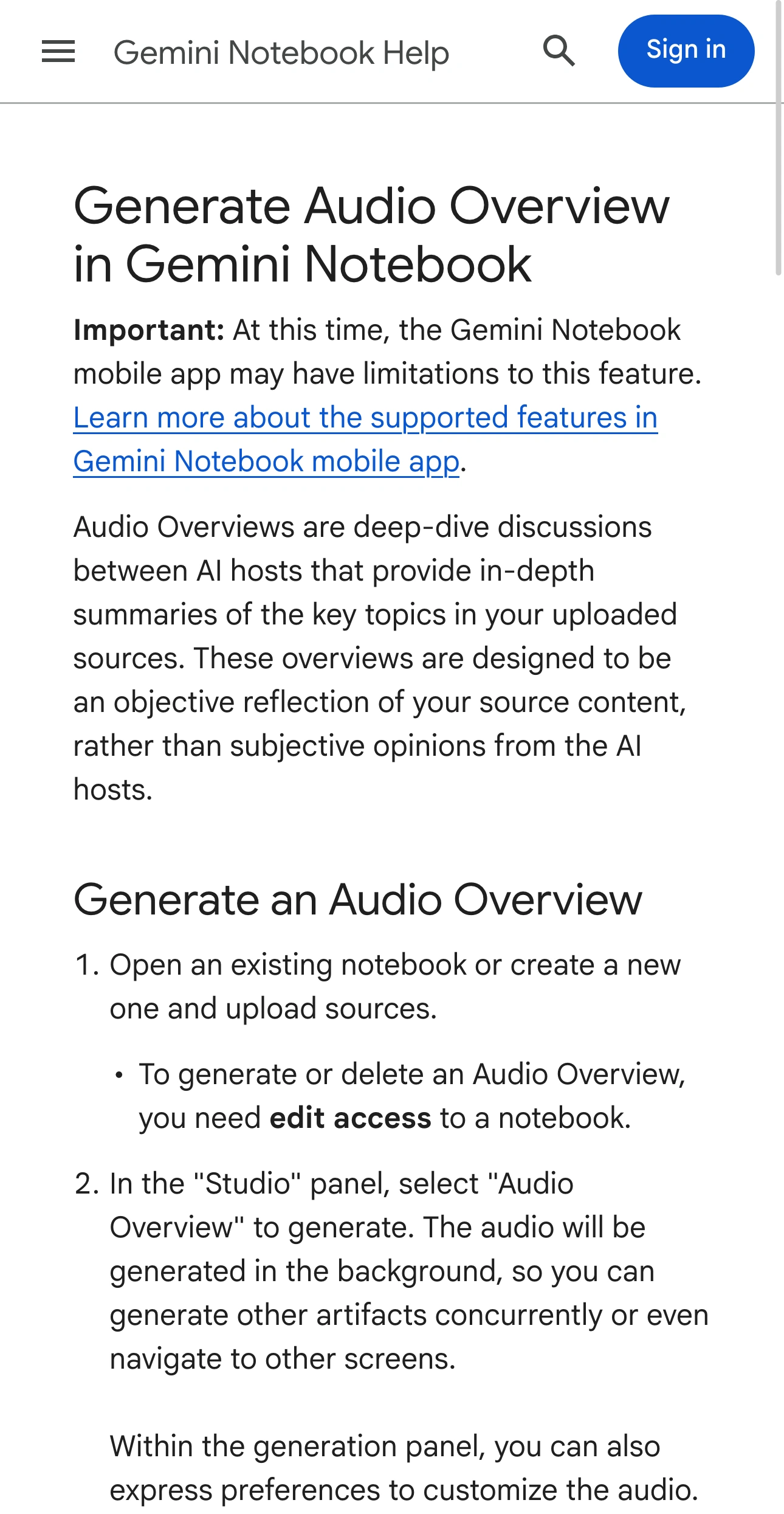
Source: Google Gemini Notebook Help, captured November 13, 2026 at native 3× resolution. This is Google's documentation, not a failed private notebook.
If the audio was already created, look for the existing artifact in Studio and use Load. That is a playback path, not a new generation. Avoid deleting a usable artifact as an experiment: Google's guide warns that deleting an audio also breaks its existing share link.
When the notice says you have reached a limit
Open Settings → Usage and read the allowance and reset shown for your account. Google's current usage documentation describes compute-based limits, five-hour refreshes subject to a weekly limit, and an estimated usage cost for Studio generation. An old fixed “audios per day” number may not describe your current account.
If the web interface offers Generate later, a deferred artifact can take a couple of hours. That is different from an ordinary generation that appears stuck. Note which option you selected before timing the job. Our NotebookLM usage-limits guide explains that policy separately from source capacity.
Thoughts Brewing, LLC's September 3, 2026 explanation below is useful specifically for this branch of the diagnosis. It covers the allowance change and deferred generation; it does not demonstrate a repair for every audio failure or every account's current Usage screen.
A paid upgrade is not evidence that a technical failure will disappear. First establish whether the product actually reports exhausted usage. If it does, choose between waiting, deferring the artifact where offered, and evaluating your future workload.
Make one small comparison without rebuilding your research
If allowance and edit access are available, use a separate notebook for a controlled check. This is a diagnostic suggestion, not a Google-guaranteed fix. Choose a short piece of text you own, confirm that it appears as a usable source, then request an Audio Overview with ordinary settings.
Keep the account, browser, language and format the same as the original attempt. Changing all of them at once might produce an audio, but it would not tell you which difference mattered. Record the result before trying another variation.
| Result of the comparison | What to investigate next |
|---|---|
| The short text generates successfully | Inspect the original notebook's selected sources and their accessibility. |
| Both notebooks show the same usage notice | Follow that notice and the account's reset information. |
| Both fail without a usage warning | Check service status and capture evidence for support. |
| Generation completes but playback fails | Record the playback error separately; do not describe it as failed generation. |
Google's source guide distinguishes uploaded files, pasted text, web pages and YouTube sources. Web imports use the page's text rather than embedded media; supported YouTube imports require a public video with captions. A URL opening in your browser does not by itself establish that the intended material was imported.
Open the source inside the notebook and inspect what is actually present. If a specific source seems responsible, compare with a small authorized excerpt in the test notebook. Keep the original documents and your research notes. A successful excerpt test narrows the question; it does not prove that a particular file type is universally broken.
Check a service incident before repeated retries
Look at the Google Workspace Status Dashboard for current service information. An old incident found through search is historical evidence, not a live diagnosis.
For example, Google's September 11, 2025 incident report documented Audio Overview generation failures while chat and source addition continued working. The incident was resolved that day. Its useful lesson is narrow: successful chat does not prove that the audio-generation service is healthy.
If there is a matching active incident, preserve your sources and follow the update instead of repeatedly rebuilding the notebook. If there is no matching notice, keep investigating your specific failure. A clear dashboard does not explain every individual error.
For a public incident worth revisiting, PageDog can check its visible update on your Mac. Select the incident text and use a condition such as “Notify me when this incident explicitly says Audio Overview generation is restored.” Run a check and inspect the captured evidence before relying on it. The same distinction between a status notice and a personal failure appears in our Claude status-alert guide.
PageDog checks run locally on an awake, connected Mac, with hosted AI evaluating the selected evidence. It cannot repair NotebookLM, reset its allowance or generate the audio. Keep private notebook contents outside this public-status watch.
Send support a reproducible description
If the failure persists, provide the exact error, approximate start time and timezone, browser and device, and whether the short-source comparison succeeded. Describe the source type and approximate size without posting confidential source contents publicly.
A useful report is specific: “Audio generation failed twice with this message; a short text source succeeded in a separate notebook using the same account and settings.” That gives support a stronger starting point than “NotebookLM is broken,” and gives you a clear record of what to retry after a fix.