In this article
Start with the official list and your set number
Use LEGO's US Retiring Soon collection to browse the current range, then open the product page for the set you want. Match the set number as well as the name: similar characters, buildings and themes can have several different sets.
This guide checks the US LEGO online store on October 9, 2026. Switch to your own country before making a decision. A US page establishes what that store displayed during the check; it is not evidence that another country's store has the same stock or labels.
You do not need a monitoring app to answer the immediate question. Open the official page and read the product label, order status and any delivery notice together. A specialist list is useful for finding sets to investigate, but the retailer's current product page is the place to verify whether you can place an order there.
Four current examples, with two separate signals
The following sets carried Retiring soon labels and Add to Bag buttons in the US collection during our check. These are selected examples, not a complete retirement list or a promise of continued availability.
| Set and number | What the official US page showed |
|---|---|
| Arcade Machine — 40805 | Retiring soon; product page also said Available now |
| ‘Up’ House — 43217 | Retiring soon; Add to Bag on the collection page |
| Heihei — 43272 | Retiring soon; Add to Bag on the collection page |
| Cherry Blossoms — 40725 | Retiring soon; Add to Bag on the collection page |
The Arcade Machine page is a useful example because Retiring soon and Available now appeared simultaneously. Retirement and inventory answer different questions. Neither label supplies a guaranteed number of shopping days remaining.
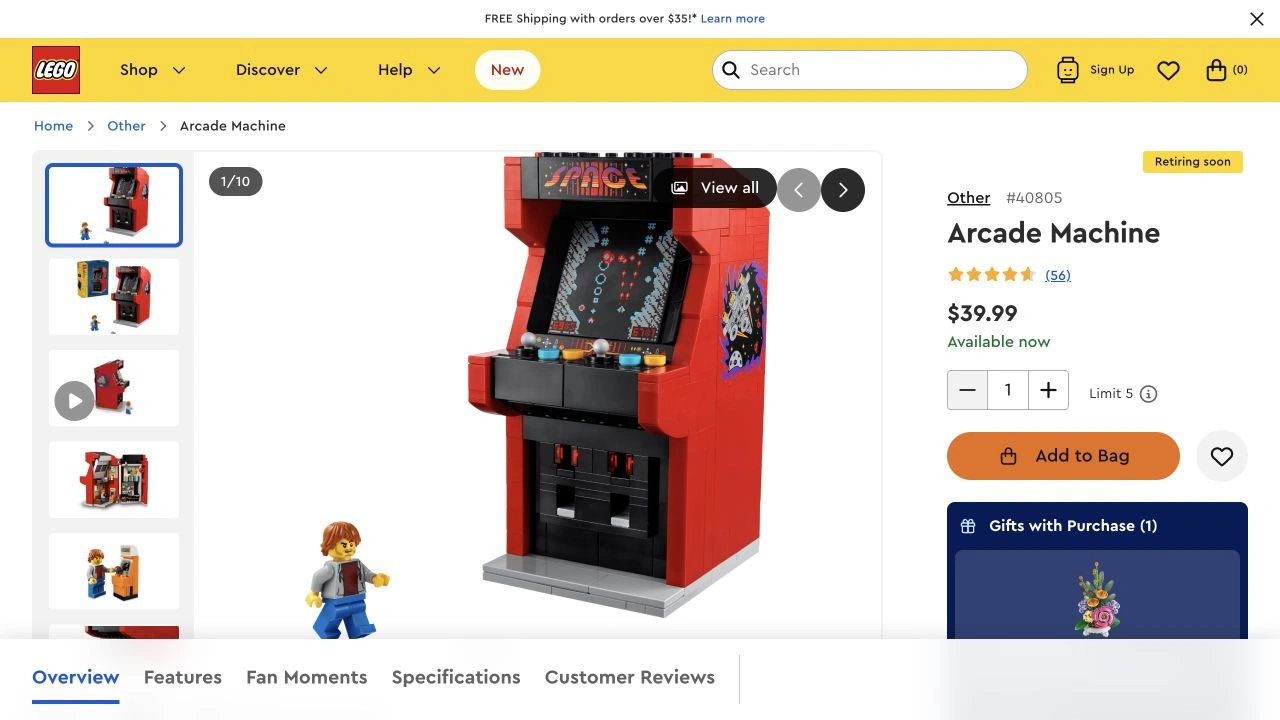
Source: LEGO US, Arcade Machine 40805, captured October 9, 2026. The page showed both statuses. Open the source for current details; the labels are transcribed in the table above.
Read the stock label before deciding what to do
LEGO's official availability-status guide explains its labels. In practical terms:
| Label | Meaning for your next step |
|---|---|
| Available now | You can order; inspect the current delivery information. |
| Backorders accepted | Ordering is available for later fulfillment; read the shipping estimate. |
| Temporarily out of stock | Stock is expected again, but the page may not offer an order now. |
| Sold out | A return is possible, without a confirmed restock date. |
| Retiring soon | The set is approaching the end of its range; this alone gives no exact last-order day. |
| Retired product | The set has left the current assortment and LEGO does not expect more stock. |
An Exclusives label concerns where a product is sold. Do not use it as a substitute for a retirement notice. Equally, a missing purchase button does not by itself explain whether a set is temporarily unavailable, retired or unavailable in your selected country.
For a gift deadline, add a third question: can it arrive when you need it? A backorder may solve eventual availability while failing your delivery deadline. Read the shipping estimate before ordering, and avoid assuming that a retirement forecast says anything about delivery speed.
Treat retirement calendars as forecasts
Specialist coverage can help you build a shortlist. Brick Fanatics maintains a retirement list spanning multiple years. Read its latest update and distinguish the publication date from the projected retirement date for a set.
The video below, published March 13, 2026, is a dated compilation from Brick Fanatics. Its title names December 31, but that should not be read as a promise that every featured set will remain orderable until the end of that day. Check the current list and official store before acting on a months-old video.
Keep a small wishlist with four fields: set number, country, current official status, and date checked. Put any predicted retirement date in a separate column marked “estimate,” with its source. This prevents a forecast copied in March from silently becoming a confirmed deadline in October.
For example, the useful record for Arcade Machine is “40805; US; retiring soon and available now; checked October 9.” Adding an unsupported final sale date would make the record less reliable. Our guide to checking when a website was updated helps distinguish a current page observation from an older article timestamp.
Watch a specific change on your wishlist
For a set you are ready to order, read the current page and make your decision. An alert is useful when you are waiting for a future visible condition, such as a set gaining a Retiring soon label while it is still orderable. If that condition is already true, as it was for Arcade Machine during our check, waiting for a new alert adds nothing.
On a Mac, PageDog can check a selected visible area of a product page against a specific goal. Include the set identity, relevant label and availability message in the selected area. For a wishlist set not yet flagged, try: “Notify me when this set is labelled Retiring soon and is available to order.” For an unavailable set, choose an order-status goal instead, and distinguish immediate stock from backorders if delivery timing matters.
Run a check and inspect the selected evidence. Avoid a region full of recommendations for other sets, which can make the condition ambiguous. The selected-area monitoring guide covers keeping the watch focused on the right product.
PageDog checks locally on an awake, connected Mac and uses hosted AI to evaluate selected evidence. It does not predict retirement dates, reserve stock or purchase a set. After a notification, reopen the official regional page, confirm the set number and read the current order and delivery status. The alert is a reason to check; the retailer's current page remains your source for the decision.