In this article
Key facts
| Question | Current answer | Important caveat |
|---|---|---|
| Is Figma free? | Starter is free | It includes limited product access and 150 AI credits per day, capped at 500 per month. |
| How much is Figma Professional? | Full: $20 monthly or $16 on annual billing | Professional is the only paid plan with a month-to-month option. |
| Are all team members billed the same? | No | Full, Dev, and Collab seats have different prices; View access is free. |
| Does the annual rate cover seats added later? | Not automatically | New Professional seats may start on a separate monthly subscription unless an admin converts them to annual seats. |
| Are AI credits pooled? | Included seat credits are individual | They reset monthly, do not roll over, and cannot be transferred; purchased add-ons create a shared pool. |
These are public US prices and rules checked on September 9, 2026. Taxes, regional rates, negotiated Enterprise terms, and temporary promotions are not included.
Figma plans and prices at a glance
The official Figma pricing page separates the plan from the seat. The plan controls administration and collaboration features; the seat controls which products a person can use and how much that person costs.
| Plan | Full seat | Dev seat | Collab seat | Billing |
|---|---|---|---|---|
| Starter | Free limited access | — | — | Free |
| Professional | $20 monthly / $16 annual | $15 monthly / $12 annual | $5 monthly / $3 annual | Monthly or annual |
| Organization | $55/mo | $25/mo | $5/mo | Billed annually |
| Enterprise | $90/mo | $35/mo | $5/mo | Billed annually |
Annual Professional totals are $192 for one Full seat, $144 for one Dev seat, and $36 for one Collab seat. Organization and Enterprise prices shown above are monthly equivalents on annual contracts, before tax.
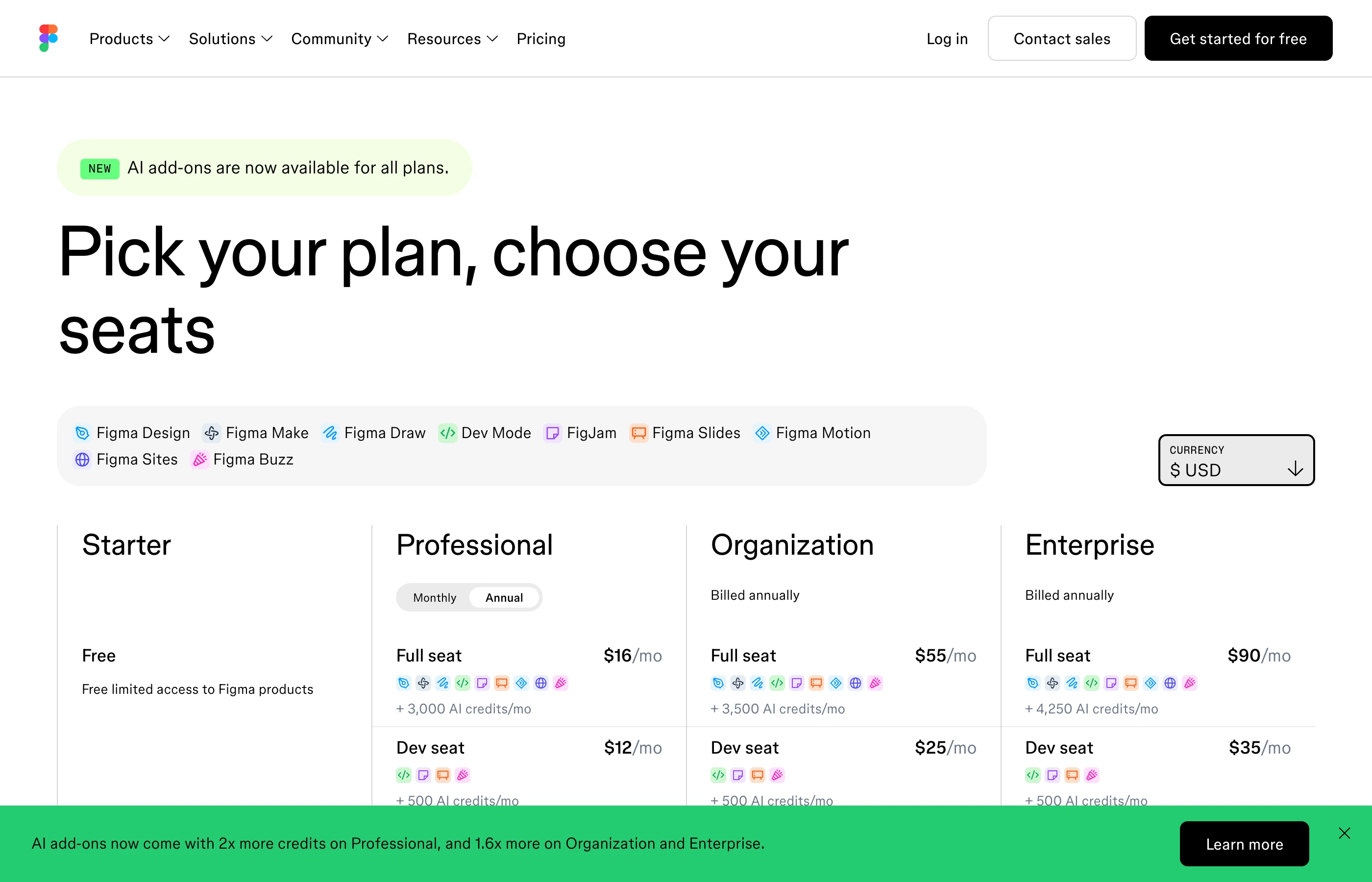
Screenshot: the official Figma pricing page with USD and annual pricing selected. Captured from the live branded page on 2026-09-09 at native DPR=2 resolution; the 2,800-pixel source is more than 3× its maximum article display width.
Which Figma seat do you actually need?
A Full seat is the paid editing seat for Figma Design and the broadest product access. It is the correct baseline for product designers and anyone creating or editing design files.
A Dev seat is for developers who need the paid Dev Mode workflow and handoff tools but do not need to edit design files. Buying Full seats for every engineer can overstate the budget; giving a designer only a Dev seat can block the work they actually do.
A Collab seat covers collaborative products such as FigJam, Figma Slides, and Figma Buzz without Full-seat access to Figma Design. A View seat can view, comment, inspect properties, copy code, and export assets for free. Start collaborators as viewers, then upgrade only the people whose work needs a paid capability.
That makes seat inventory more important than the headline plan. Ten people on Professional can cost anywhere from $0 for viewers to $200 per month for ten monthly Full seats.
Figma AI credits are a second cost layer
Figma's AI-credit guide says included credits belong to the individual seat, reset monthly, do not roll over, and cannot be shared or transferred.
| Seat and plan | Included AI credits |
|---|---|
| Starter or View | 500/month, with a 150/day limit |
| Professional Full | 3,000/month |
| Organization Full | 3,500/month |
| Enterprise Full | 4,250/month |
| Dev or Collab on any paid plan | 500/month |
The live pricing page says the Figma agent remains free during beta; standard credit usage will apply after general availability. Do not treat beta behavior as a permanent unlimited allowance.
For teams that exceed included credits, Figma's official AI-credit update lists two shared-pool options:
| Additional credits | Monthly subscription | Pay as you go |
|---|---|---|
| 5,000 | $120/mo | $150 |
| 7,500 | $180/mo | $225 |
| 10,000 | $240/mo | $300 |
The subscription prices work out to 2.4 cents per credit; pay as you go is 3 cents. First check the Admin billing and AI-usage views: changing an unnecessary seat can save more than optimizing a credit package.
The annual-pricing trap: new seats may be monthly
Annual Professional pricing is not a permanent $16/$12/$3 rate for every seat that appears during the year. Figma's Professional billing guide explains that additional paid seats can begin on a separate monthly subscription at the higher monthly rate.
Admins can explicitly add annual seats and pay a prorated charge for the remainder of the annual term. At renewal, they can choose how many seats of each type stay annual; extras can continue monthly. This flexible arrangement is useful for temporary staff, but it also explains why an invoice can exceed a simple annual-seat calculation.
Before approving a seat request, check:
- The requested seat type—not just the person's role.
- Whether the seat will be monthly or annual.
- The prorated charge and any credit for the previous seat.
- Whether a free View seat already covers the task.
Figma team-cost calculator
For a Professional team with 5 Full, 3 Dev, and 12 Collab seats:
| Billing choice | Monthly cost | Twelve-month cost |
|---|---|---|
| Annual rates | (5×$16) + (3×$12) + (12×$3) = $152 | $1,824 |
| Monthly rates | (5×$20) + (3×$15) + (12×$5) = $205 | $2,460 |
The all-annual mix saves $636 over twelve months. That saving disappears quickly if several annual seats are unused, so model the stable core annually and keep genuinely temporary seats monthly.
GuideLab's June 9, 2026 walkthrough is a concise visual orientation to Starter, Professional, Organization, Enterprise, and seat choice. It is useful for seeing the plan structure, but Figma's live page and Help Center remain authoritative for rates, billing mechanics, and AI credits.
Which Figma plan is worth it?
Choose Starter for evaluation, personal drafts, and people who only need limited access. Move to Professional when a solo designer or small team needs unlimited files and projects, advanced prototyping, or paid Dev/Collab workflows.
Choose Organization when centralized design-system management, organization-wide libraries, administration, and security controls justify the jump from $16 to $55 for a Full seat. Choose Enterprise for the highest governance, provisioning, security, and support requirements—not merely because the team is large.
For most small teams, the biggest saving is not downgrading Professional. It is assigning the correct seat type and reviewing monthly seats before renewal.
How to catch a Figma pricing change
Use Figma's Admin billing and AI-usage pages for private invoices, seat assignments, credits, and forecasts. For a public change, PageDog can watch one visible region on the pricing or Help Center page—such as the Professional Full-seat price, the AI-credit table, or the rule for newly added annual seats—and notify you when that exact evidence changes. It cannot access a private workspace or change billing.
For a broader monitoring setup, see the SaaS pricing changes guide, the website price-tracker guide, and the Notion pricing guide.
Frequently asked questions
Is Figma Professional $16 or $20 a month?
Both are current US prices for a Full seat. $16 is the monthly equivalent on annual billing; $20 is the month-to-month rate.
Can developers use Figma for free?
Free View access includes viewing, commenting, inspecting properties, copying code, and exporting. A paid Dev seat is for the fuller Dev Mode workflow and related products.
Do Figma AI credits roll over?
No. Included seat credits reset monthly, do not roll over, and cannot be transferred to another user.
Why did a new seat cost more than the annual rate?
On Professional annual plans, seats added during the term can start on a separate monthly subscription at monthly rates unless an admin explicitly converts or purchases them as annual seats.
Bottom line
Figma Professional starts at $16 per month annually or $20 monthly for a Full seat, but the real budget is the sum of Full, Dev, Collab, mid-year monthly seats, and optional AI credits. Audit the seat mix before comparing plans.
Research sources
- Figma pricing — current USD plan, seat, and included AI-credit values; checked 2026-09-09.
- Manage billing on the Professional plan — monthly and annual seats, proration, renewal, and seat changes; checked 2026-09-09.
- How AI credits work — individual credit allowances, reset, rollover, and transfer rules; checked 2026-09-09.
- Updates to AI Credits in Figma — subscription and pay-as-you-go add-on prices; checked 2026-09-09.