In this article
Check Apple's native pickup result first
Start on Apple's shopping site, select the device and finish its relevant choices. For an iPhone, those include model, finish, storage and connectivity. Scroll to the purchase summary and look for Pickup: Check availability, or a pickup status for a previously selected store.
Apple's Delivery and Pickup FAQ explains that the product page can show availability at the store you previously chose. The native checker is the simplest way to answer a one-time question; you do not need a third-party stock-alert subscription to use it.
- Confirm the exact configuration before opening availability.
- Enter the city or ZIP code where you would collect it.
- Compare the named stores and their individual pickup messages.
- Check a different color or capacity only if you would actually buy it.
- If you decide to order, review the configuration again at checkout.
This walkthrough concerns the US Apple Store, checked September 30, 2026. Other country storefronts can have different options. A US result does not establish availability in another country.
| Message or state | What it tells you |
|---|---|
| A named store offers pickup today | That configuration currently has a pickup option there. |
| A nearby store is unavailable | That store/configuration combination does not currently offer pickup. |
| Shipping has a later estimate | Delivery and local pickup are separate choices. |
| You selected a store | You have chosen a location, not completed an order. |
| Apple sends a ready-for-pickup notification | Your placed order is ready under the instructions Apple sends. |
Read the configuration and store together
In our September 30 browser check, iPhone 18 Pro, Burgundy, 256GB showed pickup availability at Apple SoHo in New York, while several other nearby stores were unavailable. The example used public ZIP code 10001, not a customer's address. The result is a dated illustration, not a live inventory feed.
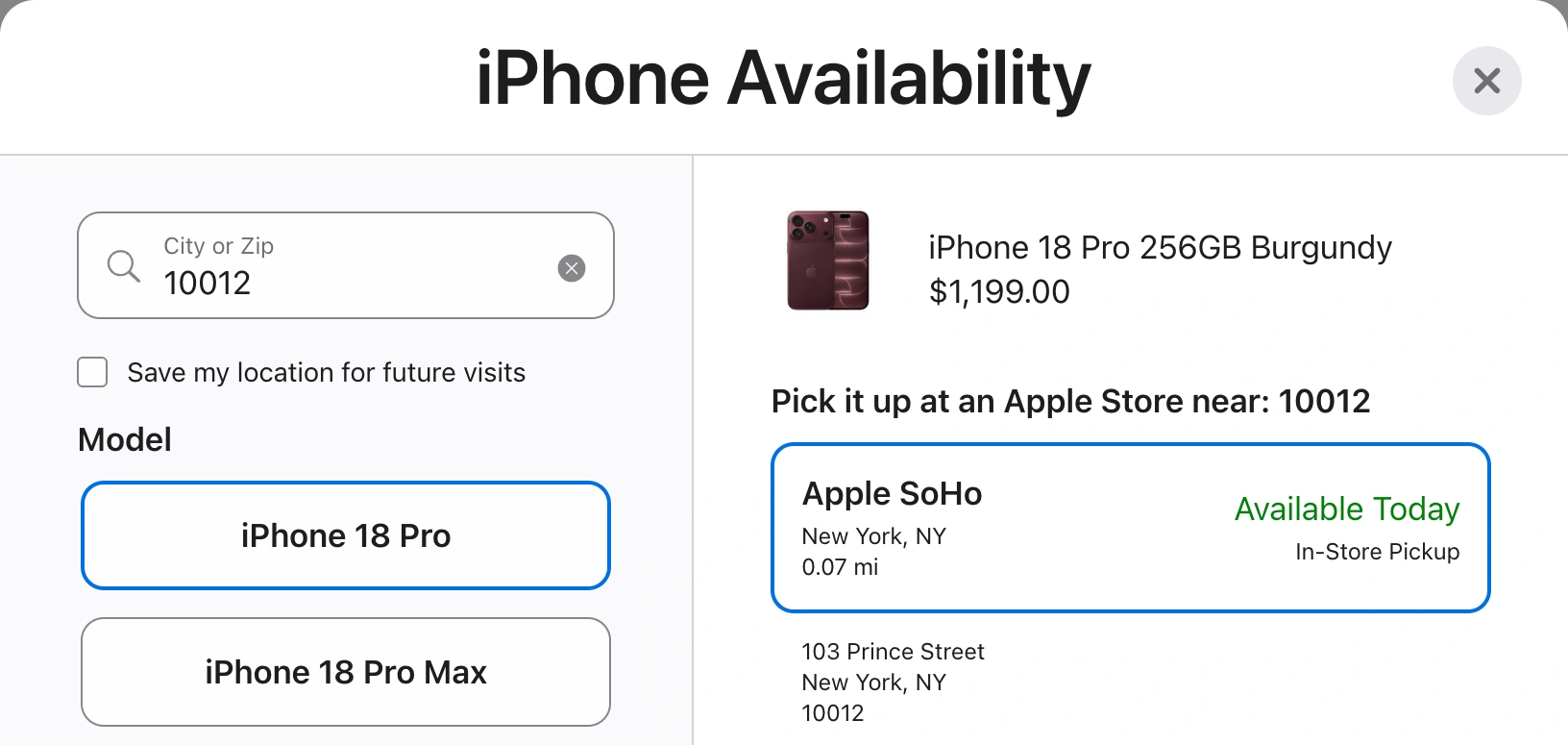
Source: Apple's iPhone 18 Pro purchase page, captured September 30, 2026. The configuration and named store belong together; stock may change. Open the full-size screenshot.
After choosing SoHo and reloading, our browser retained the device choices and displayed the store's pickup status on the product page. That makes a persistent summary a possible monitoring target. It does not prove that every browser session, product or region preserves the same state. Repeat the check in whichever browser will perform the monitoring.
Avoid the easy mistake of reading a favorable result after changing an unwanted option. A different storage capacity, finish or carrier selection can produce a different outcome. Keep a short target note, such as “Burgundy, 256GB, connect carrier later, SoHo,” and compare the final order against it.
Separate pickup stock from a reservation
Apple's Shipping and Delivery help says it sends a notification when an order is ready for pickup. Wait for that message and follow its instructions before going to the store. Finding availability, saving a product and placing an order are different steps.
Do not use an old screenshot as proof that a unit is still available. Likewise, a delivery estimate is not a promise about walk-in stock, and a pickup result is not a count of everything physically inside a shop.
If the only available location is far away, decide whether the trip is worthwhile before ordering. For example, an available device 40 miles away may be less useful than a delivery estimate you can accept. That is a travel decision, not evidence that the closer store will replenish tomorrow. The checked Apple help pages provide no universal daily restock time to rely on.
Choose between a specialist checker and a page watch
A specialist service can be useful when you want a broad view across many stores. Apple Inventory Check and the open-source Apple Store inventory checker are examples to investigate. Check their current country coverage, supported products, maintenance and alert terms before depending on them. A project's existence does not prove that it supports today's model.
For a visual explanation of the underlying purchase flow, Tech & Design's February 4, 2021 tutorial shows configuration, pickup checking and delivery choices. Around 2:12 and 4:57, it explains why the pickup result needs checking separately. This is a historical interface demonstration: its prices, promotions, shipping estimates and account advice are not current instructions.
Use the current Apple pages above for today's rules. The useful enduring lesson is to compare the chosen item and fulfillment option, rather than assuming the generic product name establishes stock.
Watch one store's visible pickup condition on your Mac
A PageDog watch fits a narrower job: you already know the configuration and store, and want an alert when their visible pickup summary meets your condition. It is not a replacement for a nationwide inventory database.
Use PageDog's documented watch workflow:
- Open the Apple product page inside PageDog and select your configuration and store there.
- Reload and confirm the same choices and pickup summary remain visible. A choice retained in Chrome is not proof it exists in PageDog's session.
- Select the summary containing both the product and store context.
- Describe the exact outcome: “Notify me when this Burgundy 256GB iPhone 18 Pro is available for pickup at Apple SoHo.”
- Run a check and inspect the captured evidence. If the store or configuration disappears after reload, fix the target before trusting the watch.
A temporary availability dialog may close during reload. Prefer a persistent summary, and do not assume PageDog will replay a series of selections. Our guide to reducing false change alerts explains why a precise condition is more useful than watching an entire busy product page.
Checks run locally and need an awake, connected Mac; hosted AI evaluates the selected evidence. PageDog does not bypass CAPTCHA, guarantee inventory, reserve a device or complete checkout. After an alert, reopen Apple, verify the options and order manually if they still suit you.
Before you make the trip
Use the native checker for an immediate answer. Consider a specialist tool for many stores, or a validated local watch for one persistent result. Before leaving home, confirm that you have Apple's ready-for-pickup message for your actual order, not merely an earlier availability alert.
Sources
- Native availability and notification: Delivery and Pickup FAQ and Shipping and Delivery help.
- Dated worked example: US iPhone 18 Pro configurator.