
In this article
Read the three dates on the official page
Start with Southwest’s Check Flight Schedules page. Its notice separates the latest travel date currently on sale from the next planned opening and the travel date that opening is expected to reach.
| Meaning | Observed September 23, 2026 |
|---|---|
| Travel currently open for booking | Through June 2, 2027 |
| Next planned schedule release | October 2, 2026 |
| Planned travel coverage after that release | Through August 2, 2027 |
Those dates are not interchangeable. October 2 is the planned day to check for newly released flights; it is not the last day you can fly. June 2 is the current booking horizon; it is not a deadline for every route or a promise that every flight before it has seats.
For a July 2027 trip, the next announcement is relevant because July falls inside the planned extension. For a September 2027 trip, the announced August horizon still would not cover it. You would need a later release, even if the October opening happens as planned.
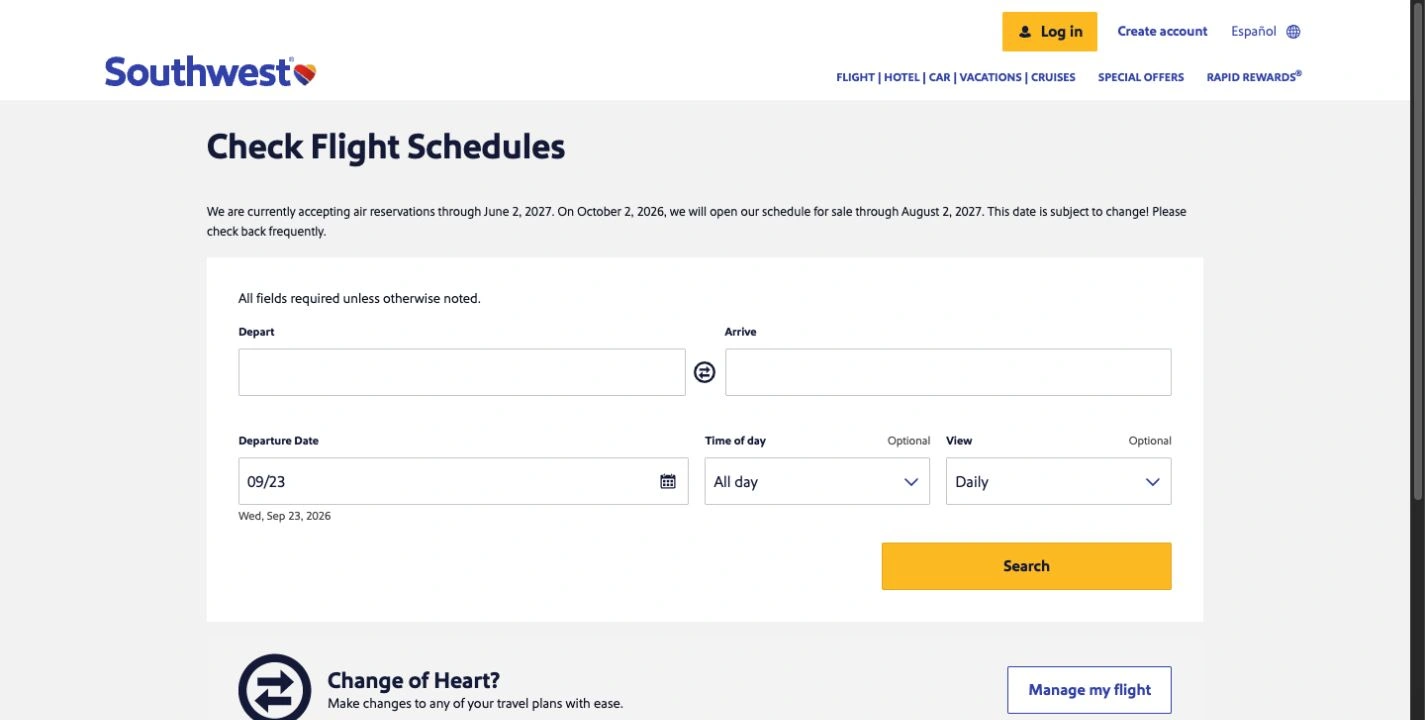
Source: Southwest Check Flight Schedules, captured September 23, 2026. These are the dates displayed at capture, not a guarantee of future inventory. Open the full-size image.
Why an older search answer can send you to the wrong day
During the same research session, Google’s AI Overview still named October 15, 2026 as the next release. The live airline page showed October 2. That is a concrete reason to open the primary source before setting a calendar reminder.
This observation does not tell us when the airline changed its plan or when every search result will refresh. It only establishes that the two surfaces disagreed during our check. A snippet, travel article or old screenshot can accurately describe an earlier announcement while no longer being a useful reminder for today.
The date-checking habit is simple: read the airline’s current notice, record when you checked it, and revisit it before the planned opening. Treat a changed notice as a reason to update your plan. Do not infer an exact release hour from the date; the captured notice did not specify one.
Check whether your travel date is unreleased or simply unavailable
An empty search result does not explain itself. First compare your departure date with the published booking horizon. A date beyond that horizon and a date inside it require different follow-up steps.
Southwest’s service and route help explains that a flight may be missing for reasons including seasonal service or a route that does not operate on the chosen day. Use the actual origin, destination and travel date when checking. Availability on a different day or through a different airport is a separate itinerary.
For example, if you want July 10 and bookings currently stop June 2, waiting for an applicable schedule extension is reasonable. If you want May 10 and find no suitable flight, repeating the next-release date is not an answer. Check nearby dates and the route information instead.
The airline’s Low Fare Calendar guidance describes viewing available fares across a month. That helps once the relevant period is on sale. It cannot expose flights the airline has not released, and a displayed fare does not promise the same price later.
Set a reminder before adding another service
If you only need to check one published release day, a calendar reminder plus the official page may be enough. Add the destination, travel dates and the page link to the reminder so you do not have to reconstruct your plan.
Southwest also offers general email updates. Read the current signup description before treating them as a notification for your exact future travel month. A general announcement is useful context, but the live booking horizon remains the thing to verify.
For a return trip, check both outbound and return dates. If one leg is outside the published window, seeing the other leg on sale does not make the whole itinerary bookable. Decide how you will compare the complete trip before making any purchase.
Track a revised announcement when the date matters
A page monitor becomes useful when you want notice that the published plan changed, or that the booking horizon now includes your intended travel date. The small announcement above Southwest’s route-search form is a clearer target than the entire homepage.
Distill’s selection guide shows how a competing monitoring tool selects part of a page. Its official April 29, 2024 video demonstrates that basic workflow:
The video is an older alternative-tool tutorial. It does not show PageDog, test Southwest, or provide current airline release dates. Use it to understand why choosing one relevant section produces a more useful monitor than selecting every changing element on a site.
Watch the booking horizon on your Mac
In PageDog, open the official schedule page, let the announcement load, and select the paragraph containing the booking horizon and planned release. Reopen the page once to confirm that the same text remains available without completing a search form.
For a July trip, a useful condition would be: “Notify me when this notice says reservations are currently open through July 10, 2027 or later.” Keep currently open in the condition: a sentence saying the airline plans to open those dates later is not the same result.
PageDog performs checks locally on an awake, online Mac and uses hosted AI to evaluate the selected visible area. Review the saved evidence after an alert, then search Southwest yourself. It does not reserve flights, guarantee a fare, or bypass login and CAPTCHA challenges. Our selected-area monitoring guide explains setup and evidence review.
After the window opens
Return to the airline’s booking flow and verify your exact airports, both travel dates and the available itinerary. Check the current fare conditions before purchasing; a schedule extension alone is not a reason to assume a particular ticket is refundable or changeable on terms you remember from a previous trip.
If you are comparing airlines, keep their calendars separate. Our Frontier release-date guide covers that carrier’s own availability process. A Southwest announcement does not predict another airline’s opening.
Once the trip is booked or you choose another option, stop the availability watch. The practical outcome is a confirmed itinerary that fits your plans, not a growing collection of release-date alerts.
Research sources
- Current dates: Southwest’s live flight-schedules notice, captured September 23, 2026.
- Route and search guidance: Southwest’s service help, Low Fare Calendar guidance and email-signup page linked above.
- Alternative monitoring workflow: Distill’s selection documentation and dated official video; search summaries were used to identify the date discrepancy, not to establish the airline’s current plan.