In this article
Start with the official Back in Stock page
Open Pokémon Center’s Back in Stock catalog in your purchasing region. This is a useful first stop when you want to browse returned merchandise. If you already know the item, open its product page and inspect its current availability instead of waiting for a general announcement.
The official restock FAQ, checked September 19, 2026, provides no future timetable. A popular claim about a Tuesday or Wednesday drop is therefore an observation or prediction unless a current official announcement names that release.
Keep the product, size or variant, and store region together. A plush returning to the US catalog does not establish that a particular trading-card box, clothing size or UK listing is available. This article checks the US storefront; other regional stores can show different offers.
What our September 19 catalog check showed
The signed-out US Back in Stock page displayed 654 catalog results during our check. Its visible first row included the Pokémon 30th Celebration Pin, Opening Scene T-Shirt, Nidorino & Gengar Showdown Bookends and a Wedding Dress Pikachu plush. This was a dated browsing observation, not a count of units or a guarantee that every size could be purchased.
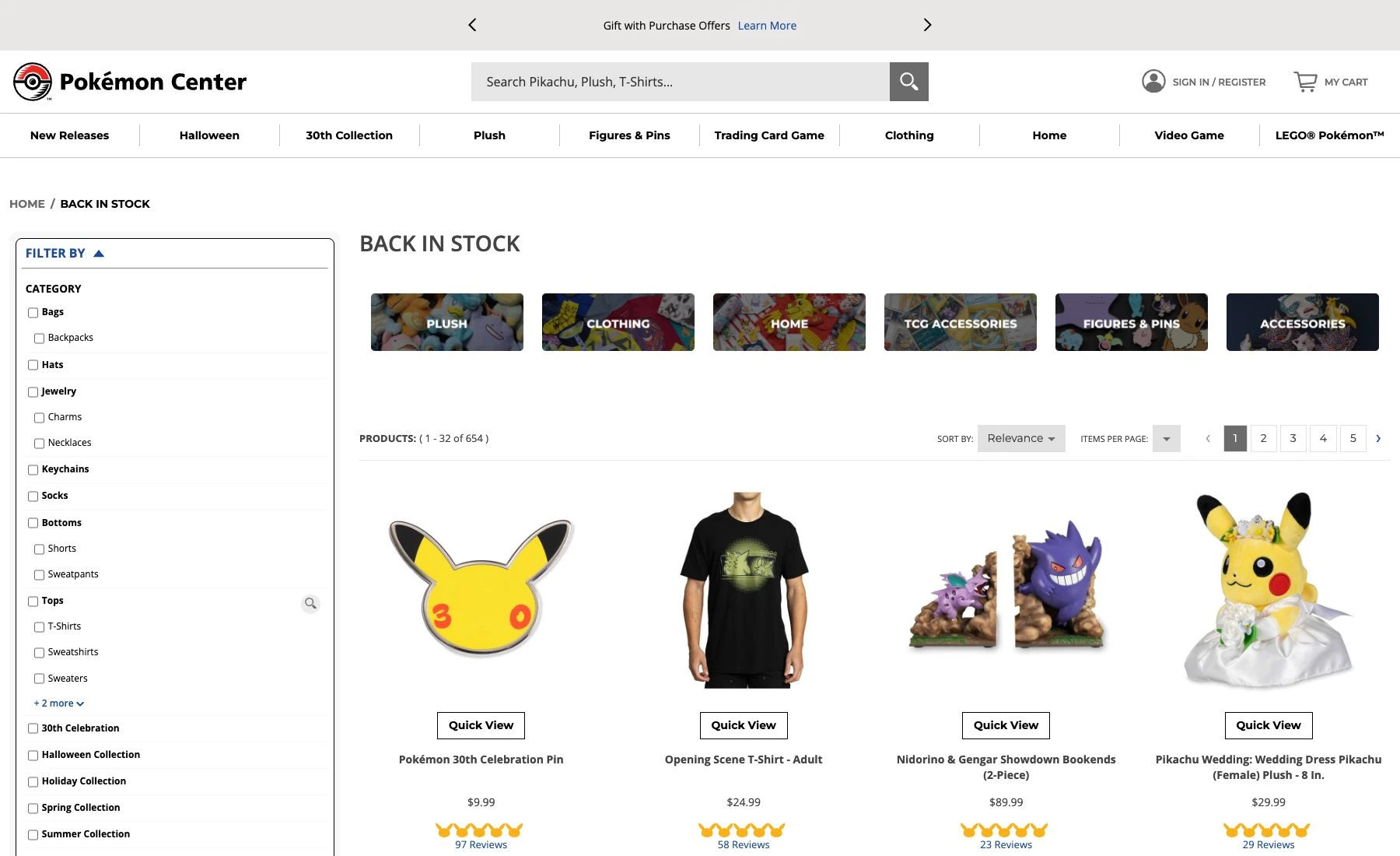
Source: Pokémon Center US Back in Stock, captured September 19, 2026. The page separates returned merchandise from the New Releases navigation. Open the full-size image for individual listings.
The practical distinction is between finding a category of returned items and confirming one purchasable offer. Use this small checklist when a restock post sends you to the store:
| What you see | What to check next |
|---|---|
| An item in Back in Stock | Open it and verify the exact variant and ordering control. |
| A New Releases post | Check whether it is a launch, preorder or currently orderable item. |
| An Early Access invitation | Read the invitation’s eligibility, expiry and account instructions. |
| A community queue alert | Confirm that it concerns your region and the product you want. |
A category count is a poor alert target: it can change because unrelated merchandise returns. An item-specific availability block gives you a much clearer decision.
Use native email and SMS updates first
The restock FAQ points readers to official announcements and the Pokémon newsletter. Those channels are convenient for discovering products, but the FAQ does not promise an email whenever a particular sold-out SKU returns.
Pokémon Center also now documents SMS marketing. Its May 5, 2026 FAQ describes texts about offers, product launches and seasonal collections, available to customers in the United States. Follow that official signup route if those updates fit your needs. We did not subscribe or test message delivery.
If a product page offers a native notification specifically for your item and variant, try it first. Otherwise, distinguish broad marketing updates from a restock alert for one product. A newsletter signup is not evidence that you will receive a guaranteed item-level notification.
Early Access is a different kind of availability
The Early Access FAQ, updated July 21, 2026, describes invitations for selected newsletter subscribers in the US, Canada and UK. Selection is not guaranteed. An invitation uses a unique, non-transferable link, and checkout requires an account with the invitation’s email address.
Read the specific email’s expiration and instructions. Early Access does not guarantee inventory, and an invitation for one offer does not establish access to future offers. Do not treat someone else’s successful purchase as proof that your public product page should offer the same checkout.
For monitoring, this matters more than a rumored drop hour. A public availability watch cannot create an invitation, change eligibility or turn a restricted offer into a public sale.
How much weight should you give restock trackers?
Independent services can add useful observations. For example, Restockd’s release history records observed US queues and describes patterns in past releases. That can help explain community discussions, but a historical pattern is not an official promise about the next product or date.
Rattle Pokemon’s July 16, 2025 guide provides collector-oriented context about releases and restocks. It predates the current Early Access FAQ, so use the official instructions above for today’s account and invitation rules. Its shopping promotions and community links are separate from Pokémon Center’s own guidance.
If you are looking for cards at a physical retailer, the process is different again: our guide to Target Pokémon card restocks concerns local retail availability, rather than Pokémon Center’s online catalog.
Watch one public product when a gap remains
For a normal product page that loads reliably, PageDog can check a selected visible area on your Mac for a specific outcome. Include the product name, variant and availability control in the selected region. A useful goal is: “Notify me when this exact plush changes from out of stock to available to add to the cart.”
Inspect the saved baseline and run a manual check before scheduling. Confirm that PageDog sees the intended store region and item. If it loads a queue, challenge, sign-in message or different variant, that is not a working stock baseline. The PageDog documentation explains selection and evidence review.
Checks require PageDog to be running and the Mac awake and online; selected evidence is evaluated by hosted AI. PageDog does not predict restocks, bypass queues or CAPTCHA, obtain Early Access, reserve stock or buy products. This suggested watch has not been validated against an actual Pokémon Center restock.
Keep the region narrow to reduce unrelated change alerts. After an alert, return to the official store yourself and verify the item, current offer and checkout conditions. Stock can disappear before you arrive.
Choose the signal that matches your item
For browsing, start with Back in Stock. For announcements, use native updates. For an invitation-only offer, follow the invitation. For one unavailable public product with no suitable native alert, test a focused availability watch. None of those steps requires inventing a universal restock schedule.