
In this article
Start with the official booking calendar
The Parco archeologico del Colosseo's ticket information states the general 30-day window and requires a reserved Colosseum entry time. Follow its link to official ticketing and choose the experience you actually want before interpreting a calendar.
Use a calendar reminder for a known release date. It is the simplest tool for remembering when to return; a page monitor is only useful if there is an additional visible change you need to follow.
Do not substitute a search result's tour listing for the park's own calendar. An independent operator's available tour can be a different package, with different inclusions and terms. Start with the official offer so you know what you are comparing.
Calculate 30 days, not one calendar month
Subtract 30 calendar days from the visit date. The same numbered day in the previous month is not always correct. For example, October 31 is 30 days after October 1, not September 30.
| Intended visit | Date 30 days earlier | What to do |
|---|---|---|
| October 1, 2026 | September 1, 2026 | Check the exact ticket's booking instructions. |
| October 18, 2026 | September 18, 2026 | Open the appropriate calendar on this date. |
| October 31, 2026 | October 1, 2026 | Do not replace subtraction with “last month.” |
These are date calculations using the park's general rule, not guarantees that a specific experience or time slot will be offered. Special products and admission arrangements need their own instructions.
If the exact product publishes a sale time, save it in the Europe/Rome time zone. Calendar software can then convert that time to where you are. Avoid keeping a fixed UTC offset through a daylight-saving change, and distinguish the time you intend to enter from the time you need to book.
Is there one daily ticket release time?
The official general information page checked on September 18, 2026 states 30 days; it does not state one universal daily release hour. Its physical opening time is not, by itself, evidence of an online ticket-drop time.
That distinction matters because advice in search results is inconsistent. A June 2026 visitor discussion describes confusion about when individual slots appear. RomeWise's ticket guide provides broader practical context, but an independent guide is not the park's binding release notice.
Check your chosen ticket page for a specific booking window or hour before setting an alarm. Do not combine a remembered seven-day rule for one experience with the general 30-day rule for another. If the current product page does not resolve your case, use the booking help contact linked from the official information page.
Choose the ticket before judging availability
The park lists several distinct experiences. A standard visit, Only Arena and underground access are not interchangeable labels for the same ticket. Availability on one calendar cannot establish availability on another.
For example, the official Only Arena description describes a 20-minute visit to the arena floor, plus its specified Roman Forum and Palatine access. That is different from assuming you have bought every level or the underground. Read the included areas before accepting an available alternative.
Also distinguish Forum Pass SUPER, which does not include Colosseum entry, from a ticket that does. A nearby monument's available ticket may still be useful, but it will not satisfy a plan that specifically requires entering the Colosseum.
Read the calendar's legend, not just its colors
Our September 18 check of the official 24H Only Arena calendar showed several states within the same month. September 20 and 21 had available-date styling, while other upcoming dates showed the sold-out symbol. We did not select a slot or complete a booking.
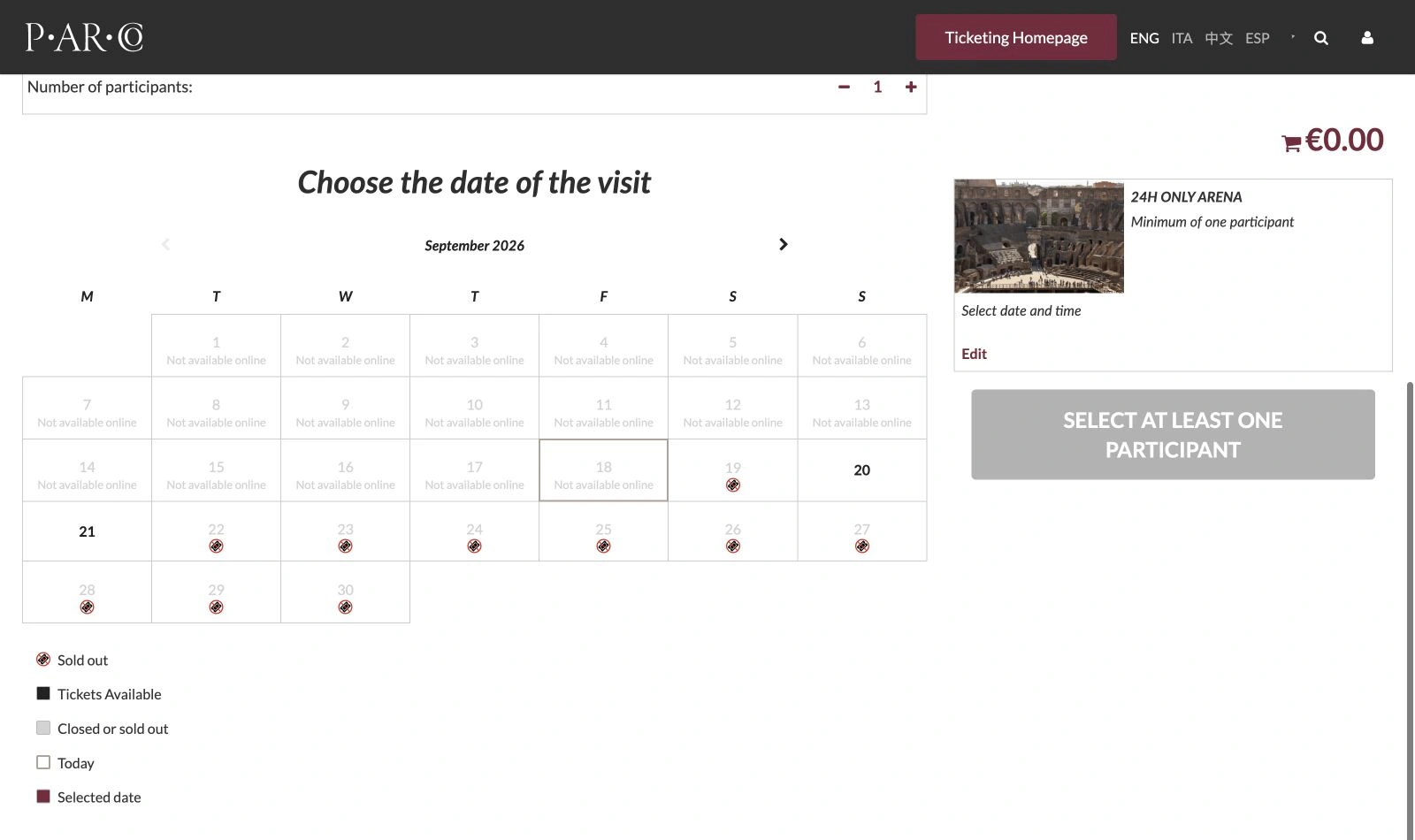
Source: PArCo official 24H Only Arena calendar, captured September 18, 2026. The legend distinguishes sold out, tickets available, closed or sold out, today and selected date. Open the full-size calendar to inspect the individual symbols. This is a dated example, not live availability.
Use three separate questions:
- Is this the right ticket and month? A different product or calendar page can explain an unexpected result.
- Is the date offered as available? Read the symbol and legend together; an inactive date alone does not explain why it is unavailable.
- Is the required slot available for your party? An active date is only the next step toward checking a specific time and quantity.
A future date outside the published booking window is not proof of a sellout. A sold-out symbol inside the window is not a promise that more tickets will return. Keep those interpretations separate when making alternative plans.
If online availability does not work for your visit
Check the park's current on-site arrangements before relying on an old travel video. Its April 30, 2026 notice moved on-site sales of the standard 24-hour Colosseum, Forum and Palatine ticket to the Piazza del Colosseo office from May 4. Forum Pass SUPER uses different offices. This does not guarantee tickets or a short queue.
RomeWise's June 21, 2026 video explains that office change and the practical difference between the purchase locations.
This is independent travel commentary with commercial tour links. Use it to understand the on-site fallback, then verify the current park notice. It does not establish the release hour of your online ticket or guarantee entry.
Watch a visible date only when the page stays usable
If a specific date remains unavailable after the booking window opens, a PageDog watch may help you notice a change in a stable, directly visible calendar region. First reload the URL manually. Confirm that the correct product, month and date remain visible without navigating through a queue or clicking through calendar months.
An example goal is: “Notify me when September 22 on this 24H Only Arena calendar is marked as having tickets available.” Include the month, year and legend in the selected evidence. After an alert, manually check time slots and party size. The PageDog documentation explains how to select an area and review the saved baseline.
PageDog does not replay calendar navigation, bypass a queue or CAPTCHA, reserve tickets or complete checkout. If your chosen month appears only after extra clicks, this setup is unsuitable. Our guide to watching a booking schedule explains that same direct-visibility requirement.
Checks run while PageDog is running and the Mac is awake and online; selected evidence goes to hosted AI. This calendar setup has not been verified against a real ticket release. Keep the watch focused to reduce unrelated alerts, and stop it when the date is no longer useful. The initial release reminder and the final booking decision remain yours.