In this article
Start with the product's own notification
On September 16, 2026, we checked an out-of-stock Walmart product listing for an Amistad notice sign. It displayed “Notify me when back in stock via email.” The shipping option said out of stock; pickup and delivery were unavailable.
That observation confirms that Walmart still offers an item-level notification on at least some listings. It does not establish that every product has the same button, how quickly an email arrives, or whether the product will return. We inspected the option without submitting an email or testing a real restock.
| What you see | What to do next |
|---|---|
| A Notify me option | Follow that item's notification flow and check the confirmation. |
| No notification option | Check another fulfillment method or consider a specific page watch. |
| Marketing push settings | Use these for broader Walmart updates; verify item alerts separately. |
| An available item | Recheck the variant and fulfillment details before ordering. |
Keep the product URL alongside the item name. A search result can include different sizes, sellers or bundles under very similar wording. Your saved link should identify the product you actually want, not merely a search for its brand.
Match the alert to how you want the item
A useful availability question includes a fulfillment method: Can this item ship to me? Can I collect it from this store? Is local delivery available? An answer to one question should not be treated as an answer to all three.
Walmart's pickup and delivery instructions begin with choosing how you want your items. Delivery availability also depends on the address. Set your intended option before deciding what an out-of-stock label means.
Use this short check before subscribing or creating a watch:
- Match the exact product, pack size, color and other variants.
- Check the seller shown on the listing.
- Select shipping, pickup or delivery and verify the relevant location.
- Read the availability beside that option, rather than relying on a general search snippet.
- Recheck those details when an alert arrives.
Walmart's May 13, 2020 animation illustrates the difference between collecting an order and having it delivered. The basic distinction remains useful, but this is an older explainer: use the current help page linked above for today's steps. The video does not demonstrate restock alerts, current app screens or notification speed.
An aisle location is another piece of context, not a subscription. Similarly, a pickup order's ready notification concerns an order you have already placed. Neither should be confused with an alert that an unavailable item has returned.
Separate marketing push from a restock email
Walmart's marketing push guide describes updates about trends, new arrivals and deals. It requires notifications to be allowed both in the Walmart app and in your phone's settings.
Those permissions matter for app messages, but enabling them is not the same action as subscribing to a specific listing's back-in-stock email. If your aim is one product, look for its own notification control and read what that flow promises.
If you expect an email, check the address used and your spam folder. If you expect a push notification, check the app and operating-system permissions. Troubleshoot the channel you actually selected instead of changing unrelated settings.
Treat availability as a momentary observation
Walmart's out-of-stock help page says an item can become unavailable between placing an order and processing it. Its explanation does not provide a universal hour or weekday when every item returns.
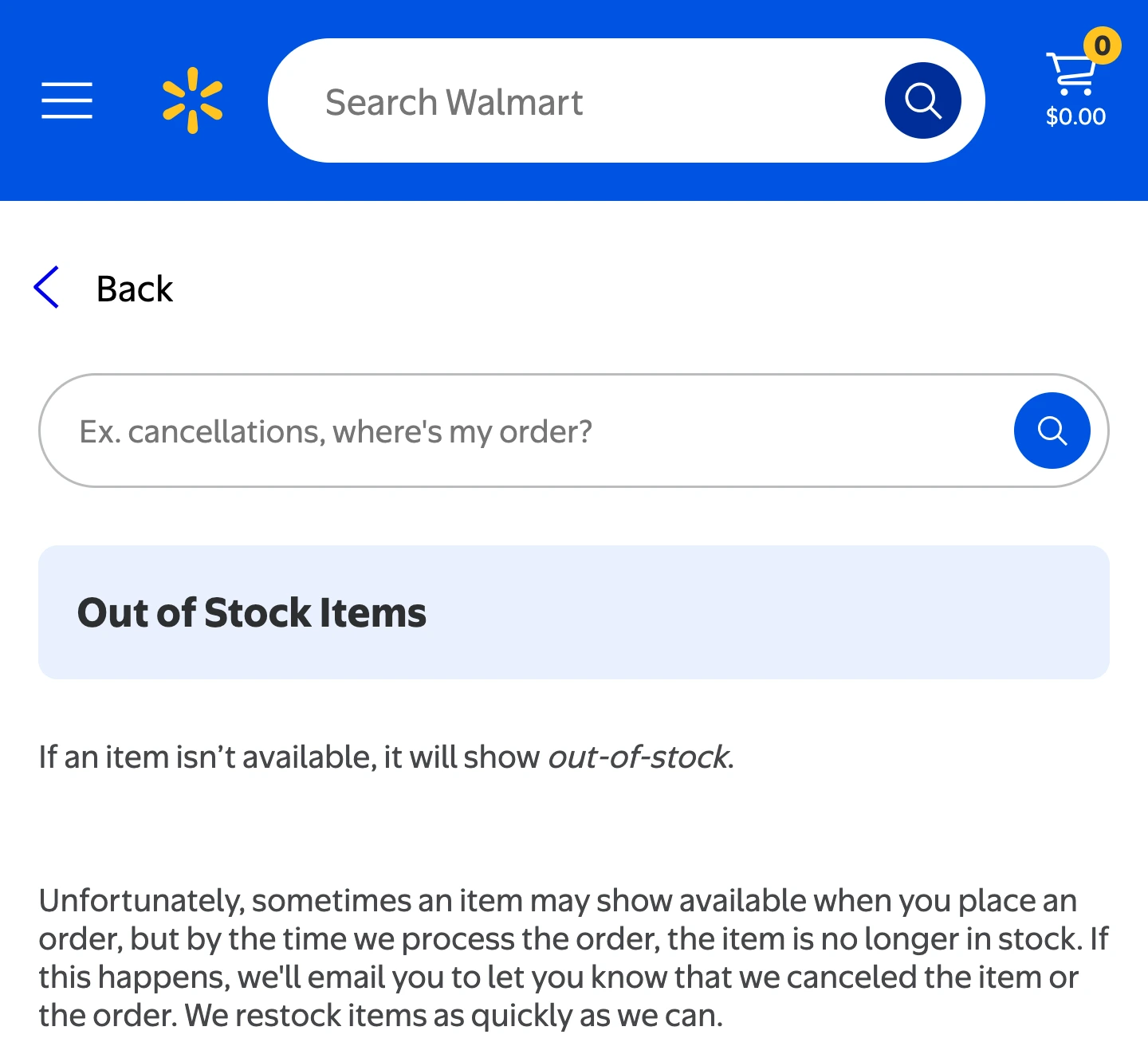
Source: Walmart Help, captured September 16, 2026. The policy explains why a visible availability signal is not a reservation.
An alert should therefore prompt a fresh check. It cannot guarantee stock remains when you open the page or complete checkout. Avoid treating an anecdotal restock schedule as a promise for your store and product. For one frequently searched product family, our Walmart NeeDoh restock guide separates specific observations from general timing claims.
Use a page watch only for the remaining gap
If the item offers a suitable native alert, start there. When that option is missing or does not cover the visible condition you need, a website monitor is another approach. Visualping's Walmart guide and PageCrawl's Walmart guide explain their respective monitoring workflows. Their claims about coverage or delivery speed should be checked against your exact page; we did not benchmark these services.
With PageDog on a Mac, the useful target is a small, visible availability region:
- Open the product and set the intended variant and fulfillment method.
- Select the region containing that context and its stock status.
- Describe a goal such as “Tell me when this selected item is available for shipping, instead of out of stock.”
- Inspect the saved baseline. If the correct item, method or location is missing, fix the selection before relying on it.
- Choose a schedule, then review the evidence and reopen Walmart after a matching alert.
The PageDog documentation explains setup and evidence review. This is a conditional workflow, not a verified guarantee that every Walmart page works. If a challenge or error replaces the product, the watch has no usable stock evidence; do not try to bypass that protection.
Checks run while PageDog is running and your Mac is awake and online. Selected evidence is sent to hosted AI to evaluate the goal. PageDog does not buy, reserve inventory or guarantee an alert before stock disappears.
Decision rule: use the item's notification first, confirm the exact fulfillment state, and add a narrowly scoped watch only when a real notification gap remains.
Research sources
- Walmart: the linked product listing, out-of-stock policy, pickup and delivery guide, and marketing push instructions.
- Demonstration and alternatives: Walmart's dated pickup and delivery animation, plus Visualping and PageCrawl's linked Walmart guides.