In this article
Key facts
| Question | Current answer | Important caveat |
|---|---|---|
| Is ChatGPT unlimited? | Everyday text chats are unlimited on Free and Go | Abuse-prevention safeguards still apply, and tools have separate limits. |
| When does a ChatGPT limit reset? | ChatGPT shows the applicable reset time in-product when available | The window can be daily, weekly, monthly, or product-specific. |
| Does Plus publish one fixed prompt quota? | No single permanent number is published for every Plus workload | Model choice and manually selected reasoning can change which allowance is used. |
| Is GPT-6 Pro unlimited on Pro? | No | Pro $100 includes 50 messages per week; Pro $200 includes 200 GPT-6 Pro messages per week. |
| Do Chat, ChatGPT Work, and Codex share one pool? | No | Work and Codex share usage with each other, but their allowance is separate from Chat. |
| Can Support reset a limit? | No | Wait for the displayed reset or use another available option. |
These rules were checked against OpenAI’s live documentation on September 5, 2026. Model rollouts, plan names, and allowances can change quickly, so the message and reset time shown inside your account remain the authority for your access.
Start by identifying which limit you hit
“You’ve reached a limit” is not enough information by itself. First identify the surface, model, and feature named in the notice.
| Surface or feature | Current rule | What to check |
|---|---|---|
| Everyday text on Free or Go | Unlimited, subject to safeguards | Confirm that the notice is not for a tool or GPT. |
| Manually selected reasoning | Plan- and model-dependent | Read the model name and reset time in the notice. |
| GPT-6 Pro or GPT-5.6 Sol Pro | Fixed Pro-model allowances on eligible plans | Check whether the pool is daily, weekly, monthly, or shared. |
| Uploads, images, voice, or data analysis | Separate tool limits | Wait for that tool’s limit; ordinary text may still work. |
| ChatGPT Work or Codex | Separate from Chat; shared with each other | Open the Work/Codex usage view, not the normal Chat notice. |
| A GPT on Free | Access can pause until its model limit resets | Use the reset timing shown in-product. |
This separation prevents the most common mistake: copying a quota from another user who was using a different model or product. A Plus user doing ordinary Chat work, a Pro $200 user selecting GPT-6 Pro, and a Codex user running a repository task are not consuming the same allowance.
What “unlimited” means now
OpenAI’s Free Tier FAQ and current GPT-5.6/GPT-6 guide explicitly say Free and Go users have unlimited everyday text chats. That is a major change from older guides built around a fixed rolling text-message cap.
It does not make every ChatGPT feature unlimited. File and image uploads, image creation, voice, data analysis, and other tools keep separate usage limits. GPT access on Free can also pause when its applicable model limit is reached. Safeguards may temporarily restrict abusive or unusually risky use.
TechCrunch’s August 2026 coverage is useful context for when the everyday-text rule changed. For the operative rule, use OpenAI’s Help Center rather than an older quota table in a search result.
GPT-6 Pro and GPT-5.6 Sol Pro still have caps
The word “Pro” does not mean unlimited access to the Pro models. OpenAI currently publishes these allowances for Chat:
| Plan | GPT-6 Pro allowance in Chat | GPT-5.6 Sol Pro relationship |
|---|---|---|
| Pro $200 | 200 messages per week | Separate 170 messages per day; both models together are capped at 200 messages per day. |
| Pro $100 | 50 messages per week | One shared 50-message weekly pool across GPT-6 Pro and GPT-5.6 Sol Pro. |
| Business Standard | 15 messages per month | One shared included monthly pool across both Pro models. |
| Business Premium | 50 messages per week | One shared included weekly pool across both Pro models. |
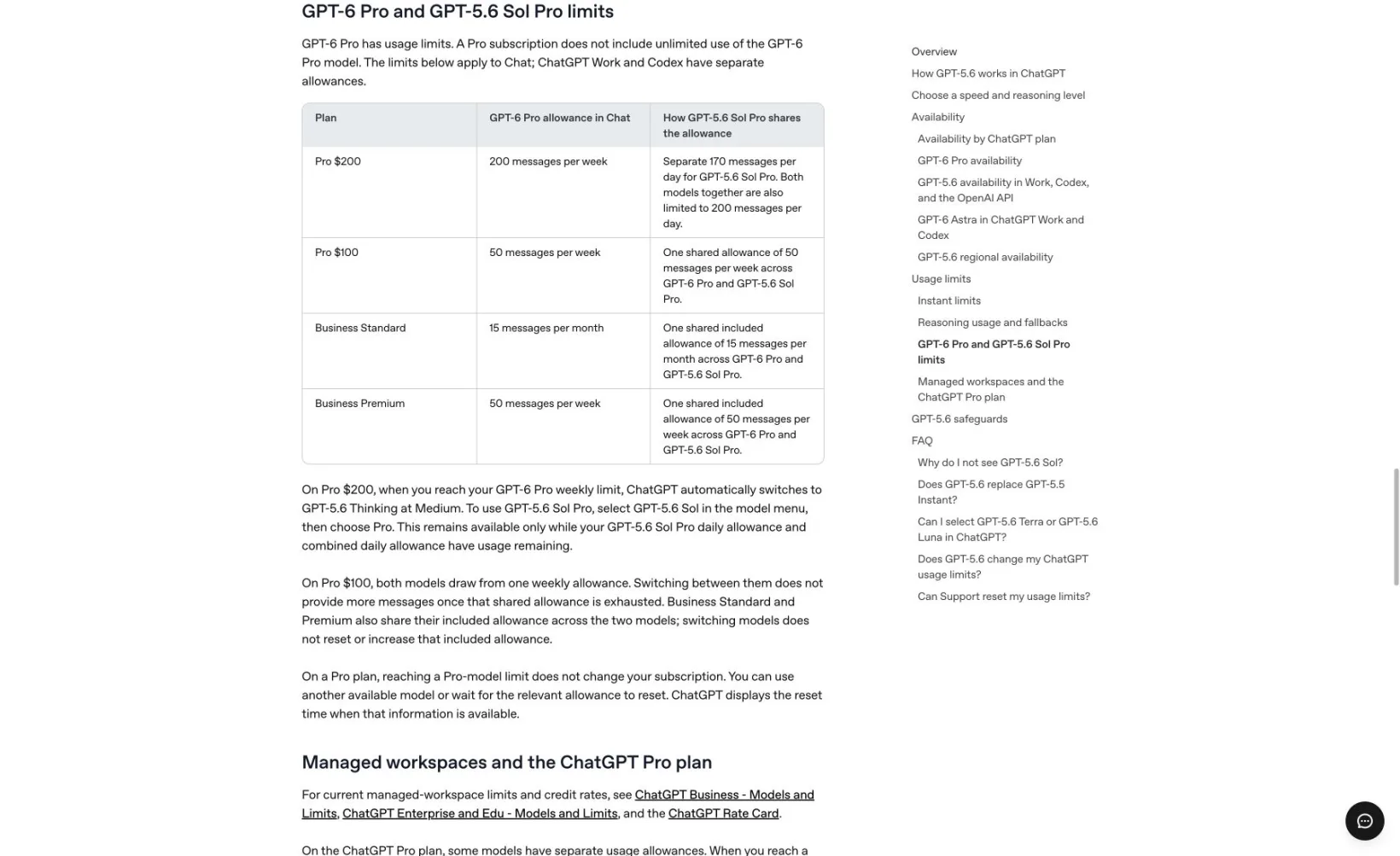
Screenshot: the official OpenAI model guide shows the current Chat allowances and how GPT-5.6 Sol Pro shares them. Captured 2026-09-05 at 1,280 pixels, then conventionally resized to 1,640 pixels and encoded as WebP without altering the visible content.
On Pro $200, exhausting GPT-6 Pro switches Chat to GPT-5.6 Thinking at Medium. GPT-5.6 Sol Pro can remain available only while its daily allowance and the combined daily allowance both have room. On Pro $100, switching between the two Pro models does not create a second pool.
Reset clocks are attached to allowances
There is no single “ChatGPT reset time.” The Pro table alone contains daily, weekly, and monthly windows. Other reasoning and tool limits may use different windows, and managed workspaces can apply their own settings.
OpenAI says ChatGPT displays the reset time when that information is available. If a manually selected reasoning allowance is exhausted, ChatGPT may continue with another available reasoning model. Reaching a Pro-model cap does not cancel or downgrade the subscription; it temporarily removes that model until the relevant reset.
Support cannot manually reset ChatGPT or Codex usage. If access does not return after the displayed time, or the accounting looks wrong, contact Support to investigate rather than asking for an early reset.
Chat is separate from Work and Codex
The normal Chat allowance should not be used to estimate agentic work. OpenAI’s ChatGPT Work and Codex pricing documentation says Work and Codex share usage with each other. The current model guide separately states that their usage and credit rules are distinct from Chat.
That boundary explains why two dashboards or notices can show different remaining capacity. It also means a viral Codex “five-hour limit” screenshot does not establish the limit for an ordinary ChatGPT conversation.
This August 2026 walkthrough is useful for seeing how a long ChatGPT Work task differs from a short chat. Treat the creator’s observed consumption as one workload example—not as an official quota for another plan, model, or account.
Why reported limits disagree
Fresh community reports are valuable for finding friction, but weak for establishing a universal number. A recent r/ChatGPT discussion shows users trying to reconcile different notices, while BleepingComputer documented a temporary July relaxation during heavy GPT-5.6 demand.
The disagreement usually comes from one of five differences: plan, selected model, reasoning mode, tool, or product surface. Temporary promotions and phased rollouts add another source of drift. Record the exact wording and timestamp of your own notice before comparing it with someone else’s screenshot.
How to track a public limit change
Use ChatGPT’s native indicator for your private remaining allowance. PageDog cannot read that hidden account meter, request a reset, or predict consumption.
For a public rule, PageDog can monitor one stable visible block on an official OpenAI page—for example, the Pro-model allowance table or the sentence separating Chat from Work and Codex. Select only that complete block and describe the exact wording or number that matters. Review the before-and-after evidence when it changes.
The guide to reducing false website-change alerts explains why a focused region is better than monitoring a full Help Center page. If the real decision is which subscription fits your workload, use the separate ChatGPT Go vs Plus comparison; for another limit system, see the Claude usage limits guide.
Frequently asked questions
How many messages can I send on ChatGPT Plus?
OpenAI does not publish one permanent Plus message number that covers every model, reasoning setting, tool, and rollout. Read the model named in your notice and its displayed reset time.
Is ChatGPT Free unlimited now?
Everyday text chats are unlimited subject to abuse-prevention safeguards. Uploads, image generation, voice, data analysis, GPT access, and other tools can still hit separate limits.
Does upgrading reset a Free limit?
The Free Tier FAQ says upgrading to Plus, Pro, or Business resets Free-tier usage rates. That does not make every feature unlimited after the upgrade.
Can I bypass a weekly limit by switching models?
Only if another available model uses a different allowance. Switching between GPT-6 Pro and GPT-5.6 Sol Pro on Pro $100 does not help because they share one weekly pool.
Bottom line
Treat every ChatGPT limit as a labeled allowance, not a universal message cap. Check the surface, model, feature, and reset time in the notice. Everyday text can be unlimited while reasoning, Pro models, tools, Work, and Codex remain separately capped.
Research sources
- GPT-5.6 and GPT-6 Pro in ChatGPT — current model access, Pro allowances, fallbacks, reset behavior, and Support policy; updated and checked 2026-09-05.
- ChatGPT Free Tier FAQ — unlimited everyday text, separate tool limits, GPT pauses, and upgrade reset behavior; checked 2026-09-05.
- ChatGPT Work and Codex pricing — shared Work/Codex usage and plan inclusion; checked 2026-09-05.
- ChatGPT release notes — current GPT-6 Astra rollout context; updated 2026-09-04 and checked 2026-09-05.
- BleepingComputer on temporary GPT-5.6 limit changes — independent evidence that published access can change during rollout; July 2026.